EC2 란
- EC2(Elastic Compute Cloud) 란 Regional IaaS 서비스로 아래와 같은 구성요소로 이루어져 있음
- EC2
- EBS
- ELB
- ASG
- EC2 를 대여할 때 아래 사항들을 지정할 수 있음
- OS: Linux, Windows, Mac OS
- CPU
- RAM
- Storage
- Network-attached: EBS & EFS
- Hardware: EC2 Instance Store
- It has better I/O performance since it’s physically attached
- Network Card
- Speed of the card
- Public IP address
- Firewall Rules: Security Group
- Bootstrap Script(Configure at first launch): EC2 User Data
- Runs on top of physical host machines managed by AWS using virtualization technology
- A hypervisor running on the host machine is responsible for:
- Sharing the underlying physical resources between the virtual machines
- Coordinating this multitenancy
- Isolating the virtual machines from each other as they share resources from the host
- 서버를 Application 수요에 따라 탄력적으로 확장 가능
- DR features: AMIs, EBS snapshots
- Advantages
- Integration with VPC, CloudTrail, IAM
- Flexible, pay-as-you-go pricing model
- Amazon EC2 Pricing
- On-Demand: You pay for only the compute time you use
- Reserved Instances:
1-year or 3-year term- Standard: Fixed EC2 type & Region
- Convertible: Unfixed EC2 type & Region
- EC2 Instance Savings Plans
- Provides a discount when you make an
hourly spend commitmentto an instance family and Region for a1-year or 3-year term
- Provides a discount when you make an
- Spot Instances
- Use unused EC2 computing capacity and offer you cost savings at up to 90% off of On-Demand prices
- Dedicated Hosts
Physical serverswith EC2 instance capacity that is fully dedicated to your use
- Elastic Load Balancer
- Service that automatically distributes incoming application traffic across multiple resources
- Application Load Balancer (L7: HTTP/HTTPS Routing)
- Network Load Balancer (L4: TCP Routing)
Application and OS Images (Amazon Machine Image)
.png)
- AMI 는 EC2 instance 의 customization
- Software, OS 등을 미리 설치하고 이미지화 해둘 수 있음
- 각 Region 에는 고유한 AMI 가 있음
- 다른 Region 에서 AMI 를 사용하고 싶을 경우 복사 후 사용
- Amazon Linux AMI 엔 aws-cli 가 기본으로 설치되어 있음
Instance Type
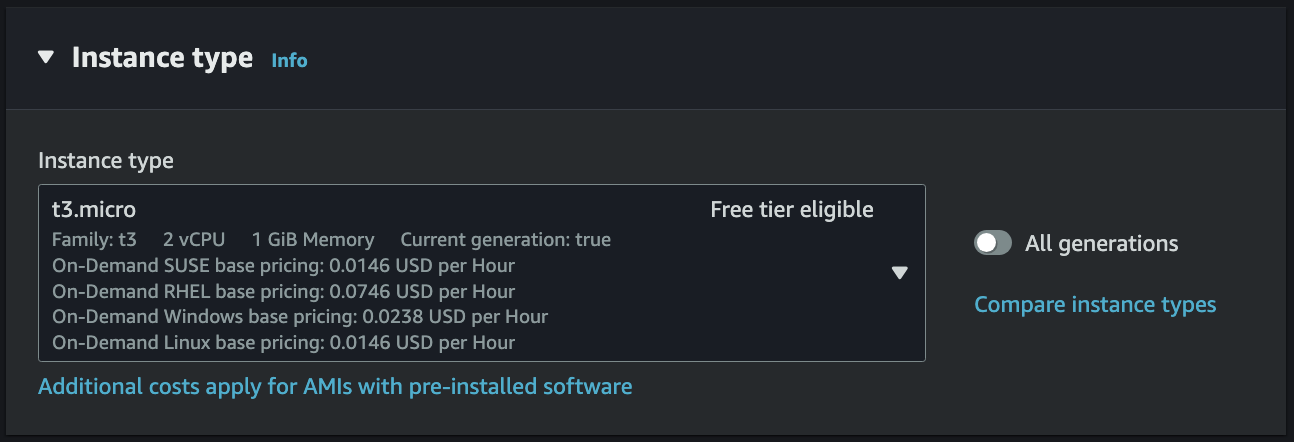
- Instance Type 이란 EC2 인스턴스의 사양으로 아래 네이밍 컨벤션을 따름
t3.microt: Instance Class3: Generationmicro: Size within the instance class
- Instance Type Variations
- General Purpose
- Compute, Memory, Networking 이 밸런스 잡힌 타입
t-family,m-family등이 해당됨
- Compute Optimized
- High performance 가 요구되는 작업을 수행할 때 사용
- Batch processing, Media transcoding, Gaming server 등
c-family가 해당됨
- High performance 가 요구되는 작업을 수행할 때 사용
- Memory Optimized
- 메모리에서 대규모 데이터셋을 처리할 때 사용
- High-performance RDB/non-RDB, Distributed web-scale cache store 등
r-family,x-family등이 해당됨
- 메모리에서 대규모 데이터셋을 처리할 때 사용
- Storage Optimized
- 로컬 스토리지의 대규모 데이터셋에 접근할 때 사용
- RDB, NoSQL, Cache for in-memory DB(Redis) 등
i-family,d-family,h-family등이 해당됨
- 로컬 스토리지의 대규모 데이터셋에 접근할 때 사용
- General Purpose
Key Pair (Login)
.png)
- 인스턴스에 접근하기 위해 SSH 를 이용할 때 필요한 Key Pair 생성
- Mac, Linux, Windows 10 이면 .pem 형식 사용 가능
- Windows 10 미만 버전이면 .ppk 사용
Network Settings
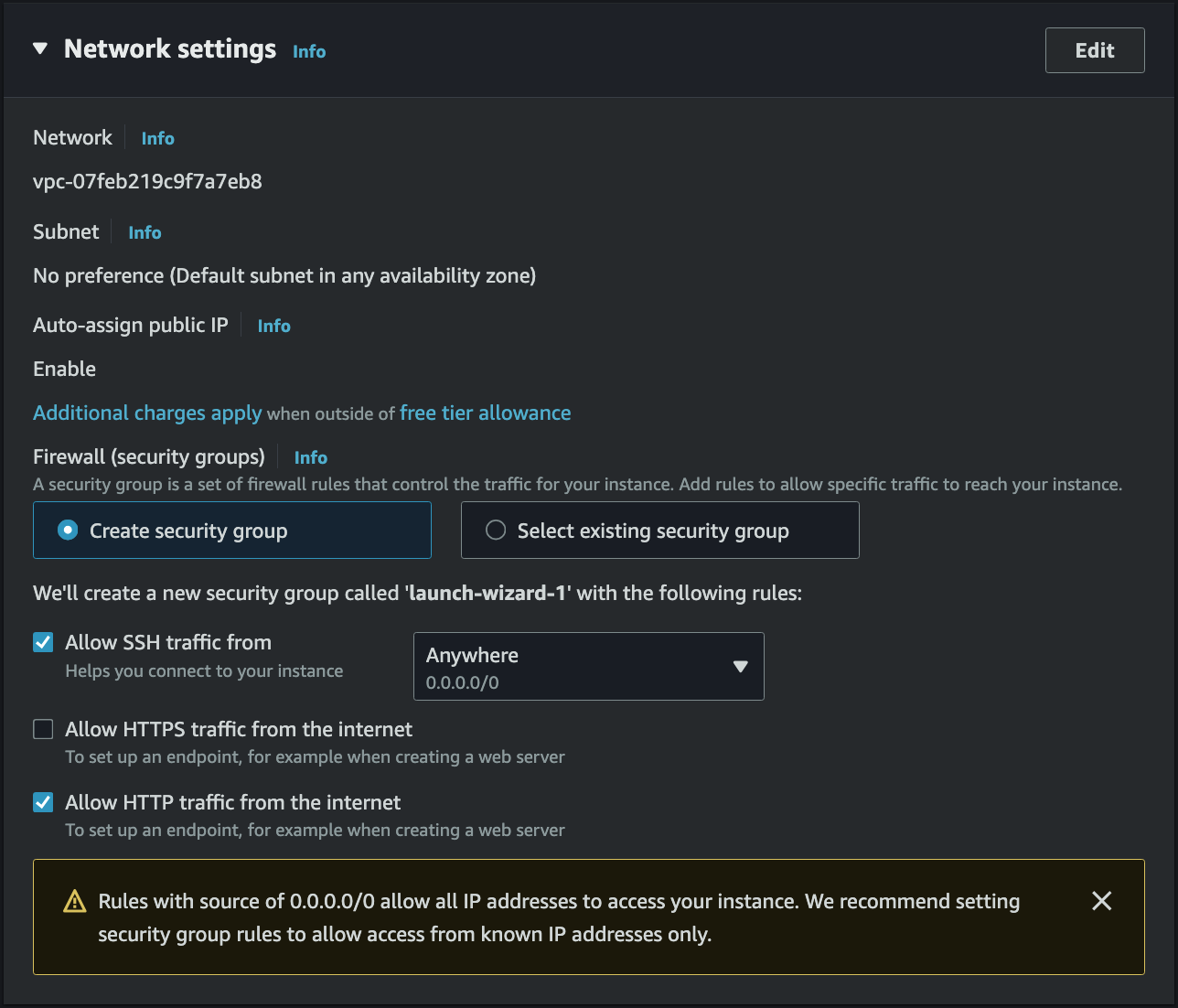
- 인스턴스가 위치할 VPC, Subnet 설정
- 인스턴스에게 공용 IP 할당 여부
- Security Group 으로 Firewall 설정
Security Group
- A
Statefulvirtual firewall that controls inbound and outbound traffic for anEC2 - It’s a Regional VPC service that lives outside the EC2
- This means any blocked traffic cannot be seen inside the EC2 instance
- Security Group can be attached to multiple instances
- By
default, itdenies all inboundtraffic andallows all outboundtraffic - Security Group rules can reference
IP & portsorother Security Groupto control access Not accessible (time out): Security Group issueConnection refused: Application error or instance is not launched
Classic Ports to know
- 22 = SSH (Secure Shell) - Log into a Linux instance
- 21 = FTP (File Transfer Protocol) - Upload files
- 22 = SFTP (Secure File Transfer Protocol) - Upload files using SSH
- 80 = HTTP
- 443 = HTTPS
- 3389 = RDP (Remote Desktop Protocol) - Log into a Windows instance
Elastic IP
- EC2 는 기본적으로 Public IP 와 Private IP 를 할당받음
- Public IP = 인터넷과 통신하기 위한 IP
- SSH 사용 시 Public IP 로 접속
- Google 검색으로 geo-location 을 쉽게 찾을 수 있음
- Elastic IP 를 통해 Public IP 를 고정으로 사용 가능
- Private IP = 내부망과 통신하기 위한 IP
- VPN 을 쓰면 SSH 로 접속 가능
- Internet Gateway 를 통해 인터넷과 통신 가능
- 특정 범위의 IP 만 Private IP 로 사용 가능
- Public IP = 인터넷과 통신하기 위한 IP
Elastic Network Interface (ENI)
- ENI is a logical component in a VPC that represents a virtual network card
- ENI lets EC2 instance access to the network
- ENI is bound to a specific AZ
- ENI can have the following attributes:
- EC2 can have a primary Private IP & 1 or more secondary Private IP
- 1 EIP or Public IP per Private IP
- 1 or more SGs can be attached to an ENI
- ENI can have a Mac address
Storage (Volumes)
.png) EC2 인스턴스 생성 시 기본적으로 Amazon EBS Root volume 으로 함께 생성된다. 추가적인 Storage 조건이 필요한 경우 추가 EBS 또는 Amazon EFS 를 마운팅하여 사용할 수 있다.
EC2 인스턴스 생성 시 기본적으로 Amazon EBS Root volume 으로 함께 생성된다. 추가적인 Storage 조건이 필요한 경우 추가 EBS 또는 Amazon EFS 를 마운팅하여 사용할 수 있다.
Advanced Details
IAM Instance Profile
- EC2 Instance 에 IAM Role 을 할당할 때 사용하는 설정
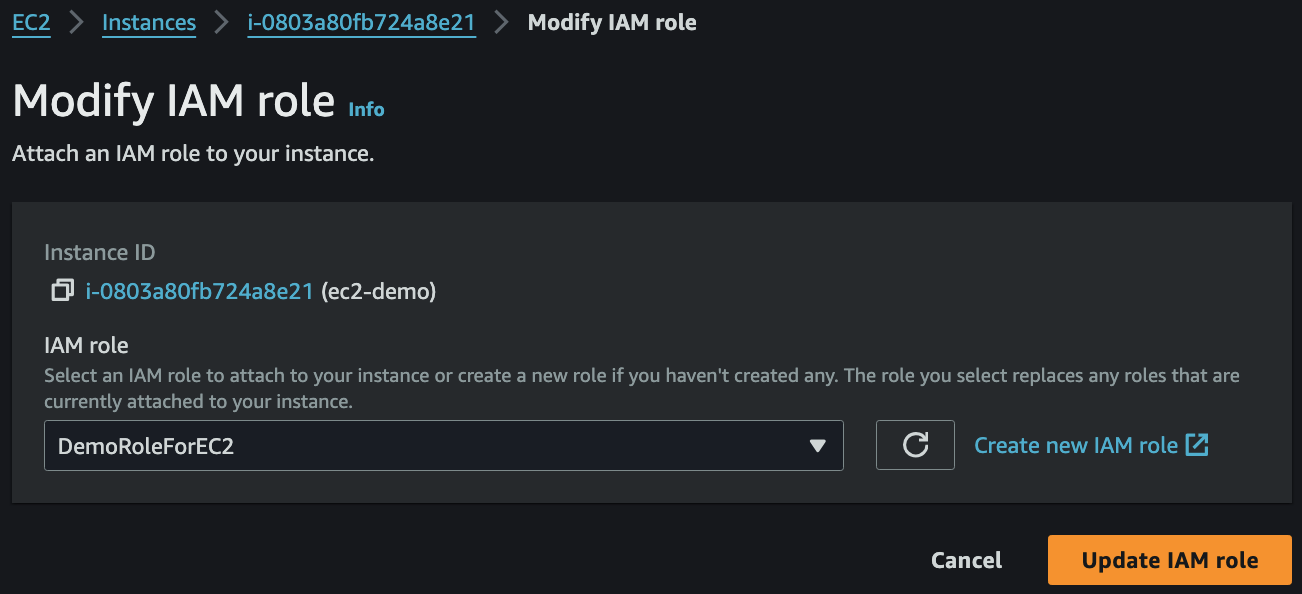
- 생성 시 할당하지 않았더라도 Actions → Security → Modify IAM role 을 통해 IAM Role 을 할당할 수 있음
EC2 Hibernate

- EC2 Hibernate 은 절전모드로 RAM state 을 root EBS volume 에 저장하는 상태
- 재부팅 시 RAM state 을 그대로 불러올 수 있음
- 전에 부팅한 상태라면 새로 부팅할 필요가 없어 부팅 시간이 단축됨
- RAM size must be less than 150GB
- Not supported for bare metal instances
- Root volume must be
EBS,encrypted, not instance store, and large enough to store RAM - Available for On-Demand, Reserved, and Spot instances
- An instance cannot be hibernated for more than 60 days
User Data
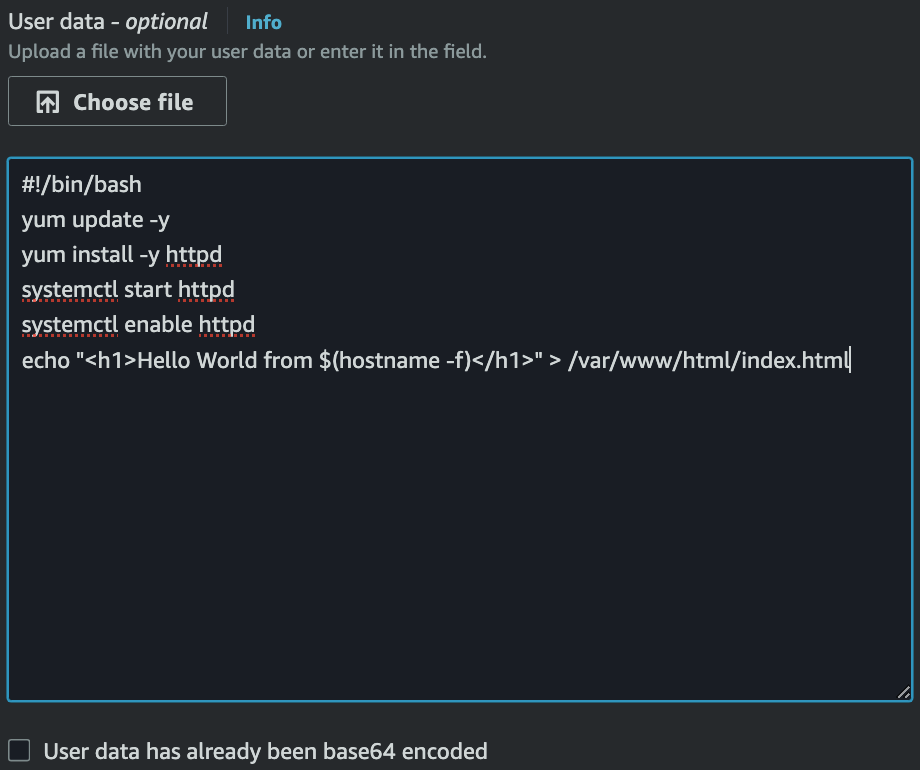
- EC2 인스턴스가 생성되면서 최초에 실행되는 script (Bootstrapping)
- 모든 명령어는 Root User 로 실행되기 때문에
sudo필수
- 모든 명령어는 Root User 로 실행되기 때문에
- 생성 시 Advanced Details 에서 작성 가능
- 제일 윗 줄에
#!/bin/bash필수
- 제일 윗 줄에
cat /var/log/cloud-init-output.log로 script 실행 로그 확인 가능
Elastic Load Balancing
- Load Balancer forwards traffic to multiple servers
- Expose a Single Point of Access (DNS)
- HTTPS for Users to LB
- HTTP for LB to instances (Set SG for EC2s to have ALB SG as an inbound rule)
- Health checks
- Provide SSL termination (HTTPS)
- Expose a Single Point of Access (DNS)
- Sticky Sessions (Session Affinity)
- Implement stickiness so that the same client is always redirected to the same instance
- This may bring imbalance to the load over the EC2 instances
- Application-based Cookies
- Custom Cookie
- Generated by the target
- The cookie name must be specified for each target group
- Application Cookie
- Generated by the Load Balancer
- Cookie name = AWSALBAPP
- Custom Cookie
- Duration-based Cookies
- Generated by the Load Balancer
- Cookie name = AWSALB
- Cross-Zone Load Balancing
- Whether to distribute evenly across AZs for Load Balancers in different AZs or not
- ALB
- Enabled by default
- No charges for inter-AZ data
- NLB & GWLB
- Disabled by default
- Charges for inter-AZ data
- SSL Certificates
- Uses X.509 certificate
- Can be managed using ACM (AWS Certificate Manager)
- Use SNI (Server Name Indication) to load multiple SSL certificates
- Deregistration Draining
- Time to complete “in-flight requests” while the instance is de-registering or unhealthy
- 0 ~ 3600 seconds (default: 300 seconds)
Application Load Balancer (v2)
- Layer 7 (HTTP) Load Balancer
- Supports HTTP/2 and WebSocket
- Load balances to multiple applications on the same machine
- e.g. Containers
- Routing tables to different target groups using Rules in ALB
- Routing based on the path in URL (
example.com/users&example.com/posts) - Routing based on hostname in URL (
one.example.com&other.example.com) - Routing based on Query String, Headers (
example.com/users?id=123&order=false)
- Routing based on the path in URL (
- Target Groups
- EC2 instances managed by ASG
- ECS tasks managed by ECS
- Lambda functions
- Private IP addresses
- ALB can route to multiple target groups
- Health checks are at the target group level
- The application servers don’t see the client IP directly
- It’s inserted in the header:
X-Forwarded-ForX-Forwarded-PortX-Forwarded-Proto
- It’s inserted in the header:
Network Load Balancer (v2)
- Layer 4 Load Balancer allows to:
- Forward TCP & UDP traffic
- Handle millions of requests per second
- Low latency ~100ms (vs 400ms for ALB)
- NLB has 1 static IP per AZ
- Supports EIP (helpful for whitelisting specific IPs)
- Target Groups
- EC2 instances
- Private IPs
- ALB
- Health checks are supported (TCP, HTTP, HTTPS)
Gateway Load Balancer
- Operates at Layer 3 (Network Layer) - IP Packets
- Uses GENEVE protocol on port 6081
- Combination of the following functions:
- Transparent Network Gateway: Single entry/exit for all traffic
- Load Balancer: Distributes traffic to virtual appliances
- Target Groups
- EC2 instances
- Private IPs
Auto Scaling Group
- Can be launched with Launch Template of EC2 instances that will be auto-scaled
- Min Capacity, Desired Capacity, and Max Capacity are configurable
- Scaling policy can be set with CloudWatch Alarms
- Dynamic Scaling Policies
- Target Tracking Scaling
- Target the metric as desired
- Simple/Step Scaling
- CloudWatch alarm trigger will add or remove instances
- Scheduled Actions
- Schedule a scaling
- Target Tracking Scaling
- Predictive Scaling
- Continuously forecast load and schedule scaling
- Dynamic Scaling Policies
- Scaling Cooldowns happen after a scaling activity
- During cooldown, ASG will not launch or terminate instances