File I/O
File f = new File(SAVE_FILE);
try {
    FileWriter fw = new FileWriter(f, true);
    fw.write(date + "," + plan + "\n");
    fw.close();
} catch (IOException e) {
    e.printStackTrace();
}
try {
BufferedReader br = new BufferedReader(new FileReader(SAVE_FILE));
while (true) {
String line = null;
try {
line = br.readLine();
} catch (IOException e) {
e.printStackTrace();
}
if (line == null) break;
String date = line.split(",")[0];
String detail = line.split(",")[1];
planner.put(date, detail);
}
} catch (FileNotFoundException e) {
e.printStackTrace();
}Scanner 와 BufferedReader
Scanner
import java.util.Scanner;

public class study {

	public static void main(String[] args) {
		Scanner scanner = new Scanner(System.in);

		System.out.println("원하는 숫자를 입력하세요");
		String input = scanner.nextLine();
		int num = Integer.parseInt(input);

		System.out.println(num);
	}
}- 공란과 줄바꿈 모두 입력값의 경계로 인식하기 때문에 쉬운 데이터 입력이 가능
- 사용하는 함수에 따라 데이터 타입을 결정할 수 있음 (문자열 파싱 기능 제공)
BufferedReader
import java.io.BufferedReader;
import java.io.IOException;
import java.io.InputStreamReader;

public class study {
	public static void main(String[] args) throws IOException {
		BufferedReader br = new BufferedReader(new InputStreamReader(System.in)); // 선언

		String s = br.readLine();
		int i = Integer.parseInt(br.readLine());

		System.out.println("String : " + s);
		System.out.println("Int : " + i);

	}
}- InputStreamReader 에 버퍼링 기능이 추가된 클래스
- InputStreamReader 는 문자열을 Character 단위로 읽음
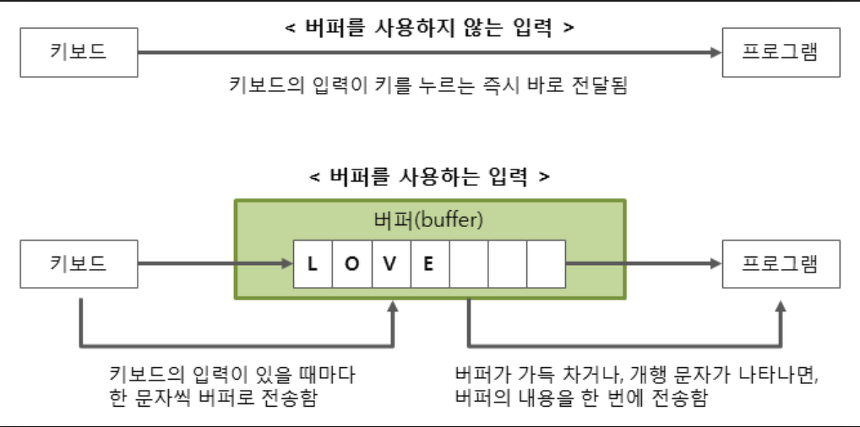
- 일정한 크기의 데이터를 한 번에 읽어와 버퍼에 보관 후 버퍼에서 데이터를 가져오는 방식
- 라인 단위로 입력 받고 String 타입으로만 입력됨
- 속도가 빠르다는 장점이 있음
Difference