IAM, Identity and Access Management
- IAM 이란 AWS Resources 접근 권한을 관리하는
Global Service이다. - Root Account 는 AWS 계정 생성 시에 기본으로 생성되고 AWS 계정 생성에만 사용한다.
- 처음 AWS 계정 생성하고 Amazon IAM 에 기본적으로 생성되는 리소스는 아래와 같다.
- User: 0 개
- User Group: 0개
- Roles: AWS 가 자동으로 만드는 SLR, Service-linked role 이 기본적으로 포함되어 있음
- Policies: AWS managed policy 가 기본적으로 포함되어 있음
- Identity providers: 0개, SAML/OIDC IdP 는 사용자가 수동 등록
IAM Users & User Groups
- User 는 하나의 조직 내 사용자에 해당하며 필요하다면 Group 으로 묶을 수 있음
- User 는 0~10개의 Group 에 속할 수 있음
- Group 은 User 만을 포함할 수 있으며 Group 을 포함하는 것은 불가능
최소 권한 원칙을 바탕으로 AWS 를 사용하게끔 하기 위해서 IAM User 와 Group 을 사용- User 또는 Group 은 JSON 형식으로 이루어진 IAM Policy 를 할당 받을 수 있음
IAM User 생성
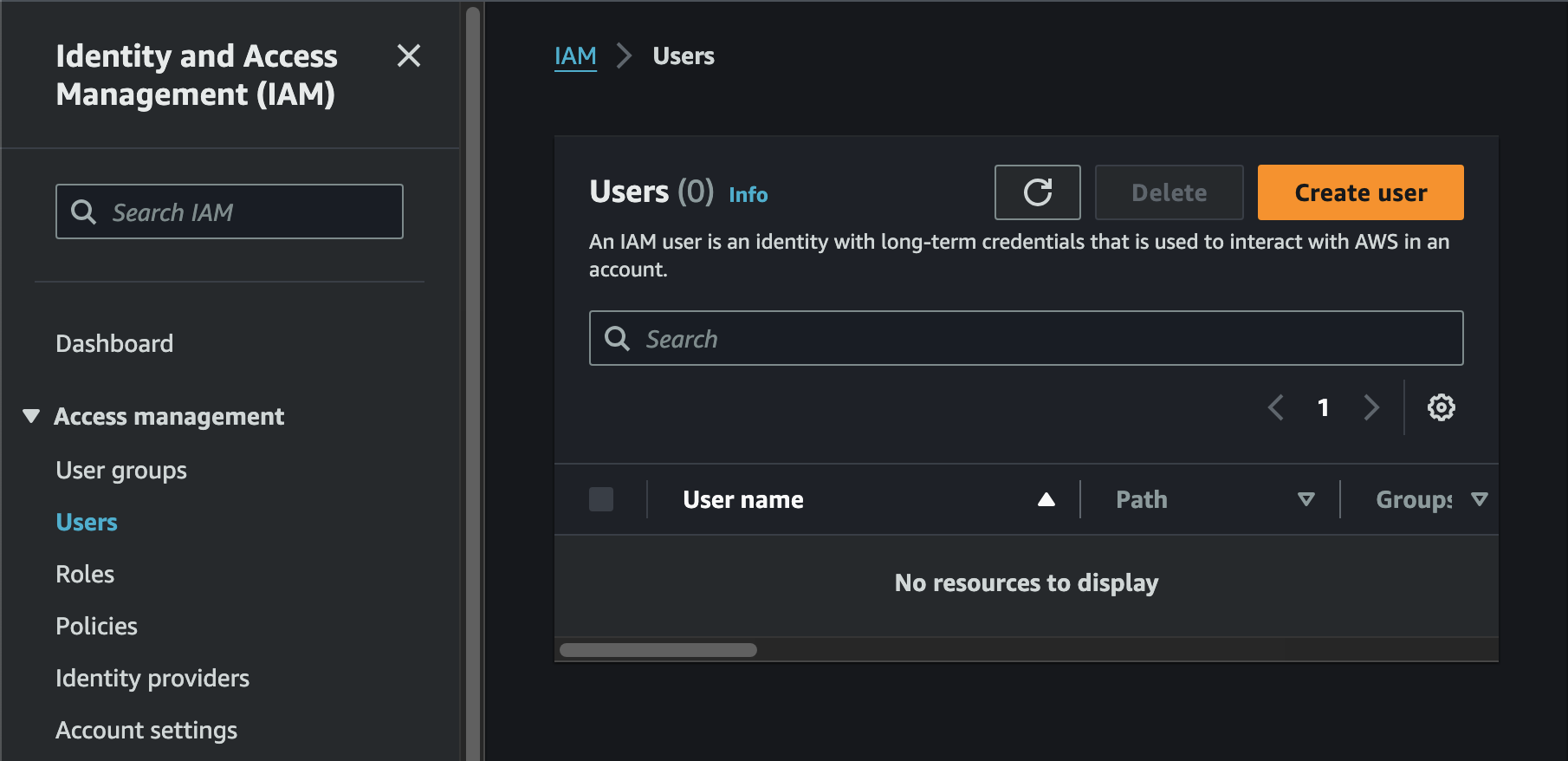
- AWS Management Console 에서 IAM -> Users -> Create user
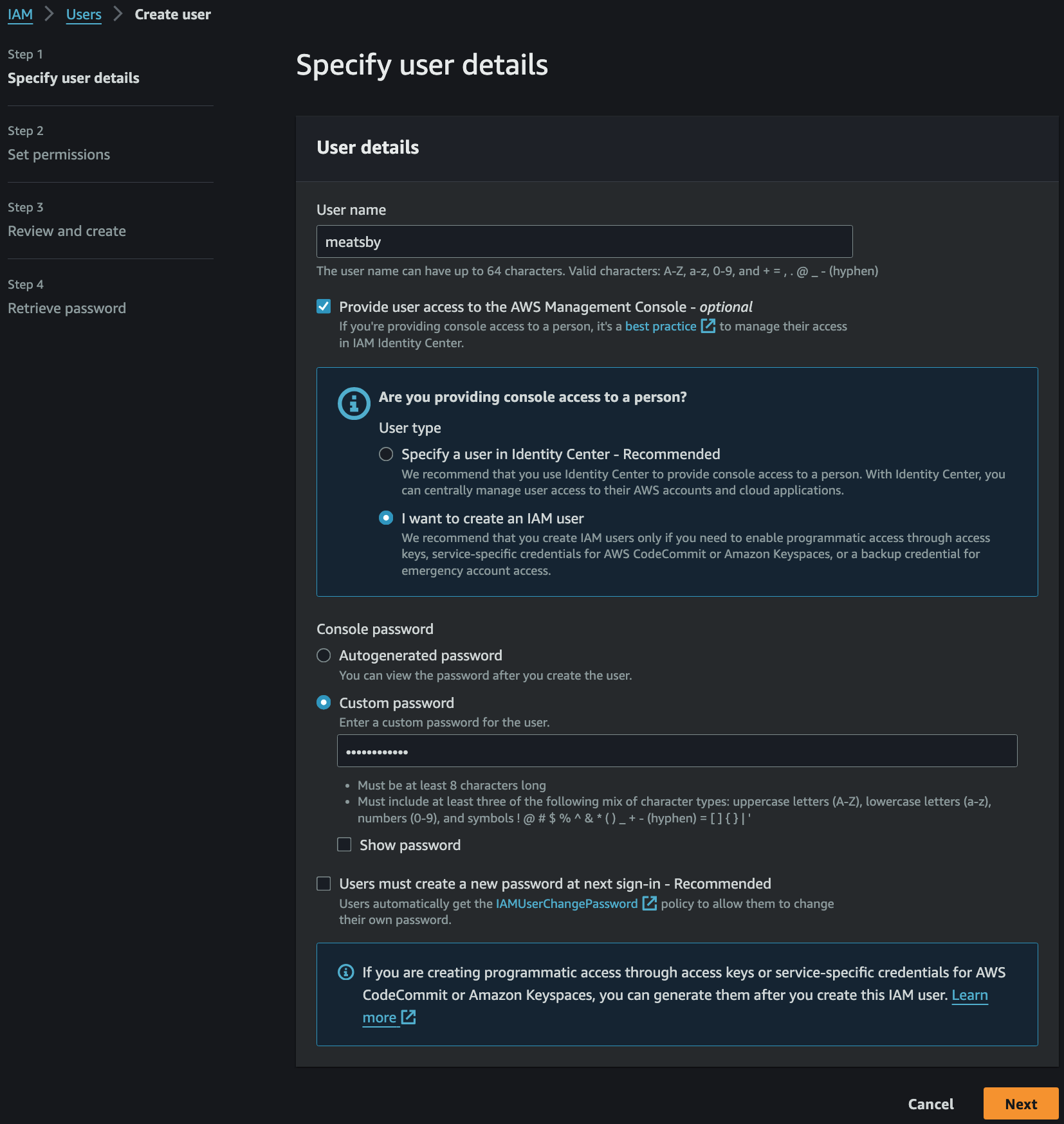
Provide user access to the AWS Management Console활성화를 통해 User 에게 AWS Management Console 이용 권한 부여Console password를 Custom password 로 설정해서 User 생성- 타인을 위한 IAM User 생성 시
Autogenerated password+User must create a new password at next sign-in으로 비밀번호 재설정 의무화
- 타인을 위한 IAM User 생성 시
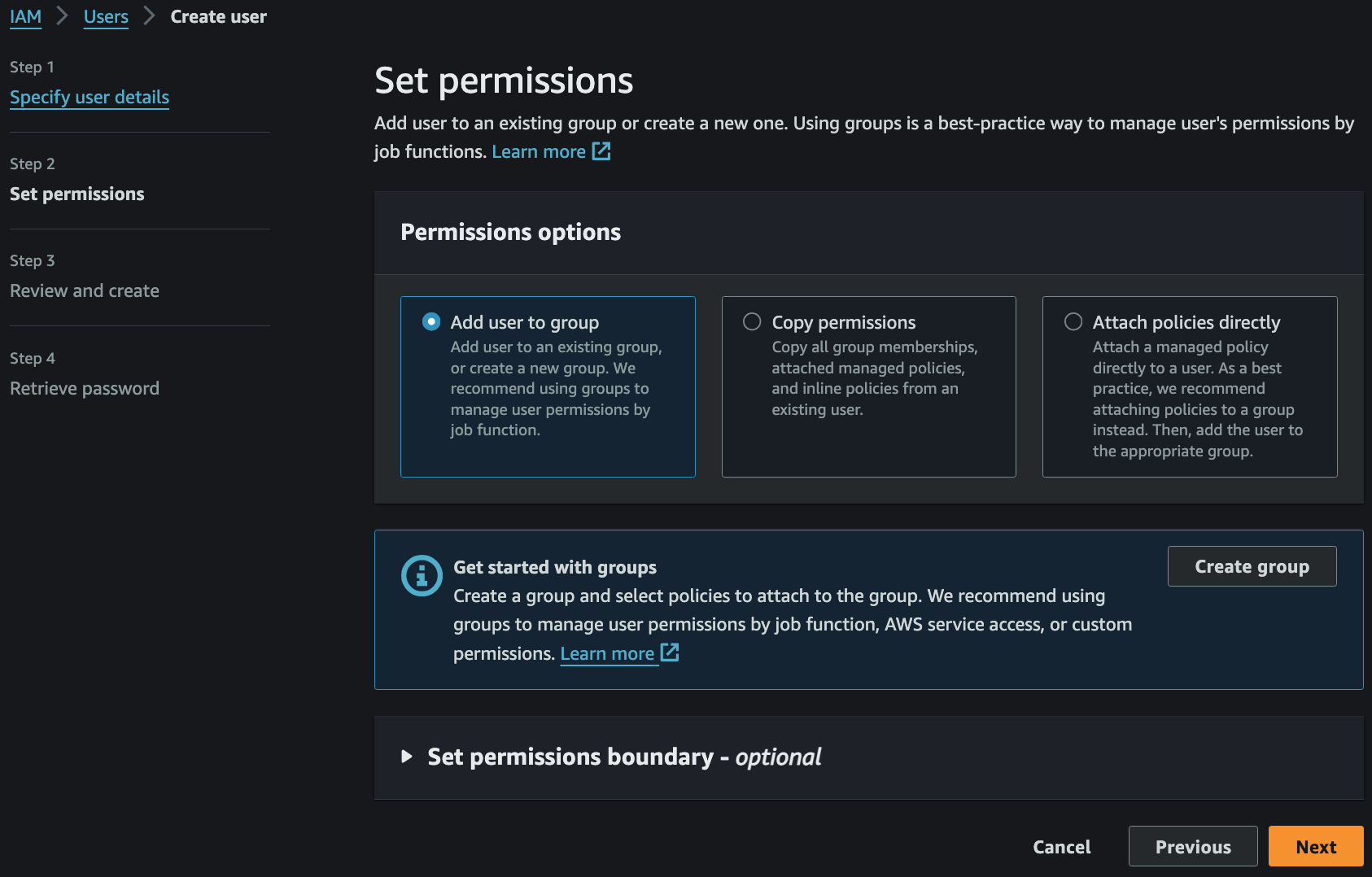
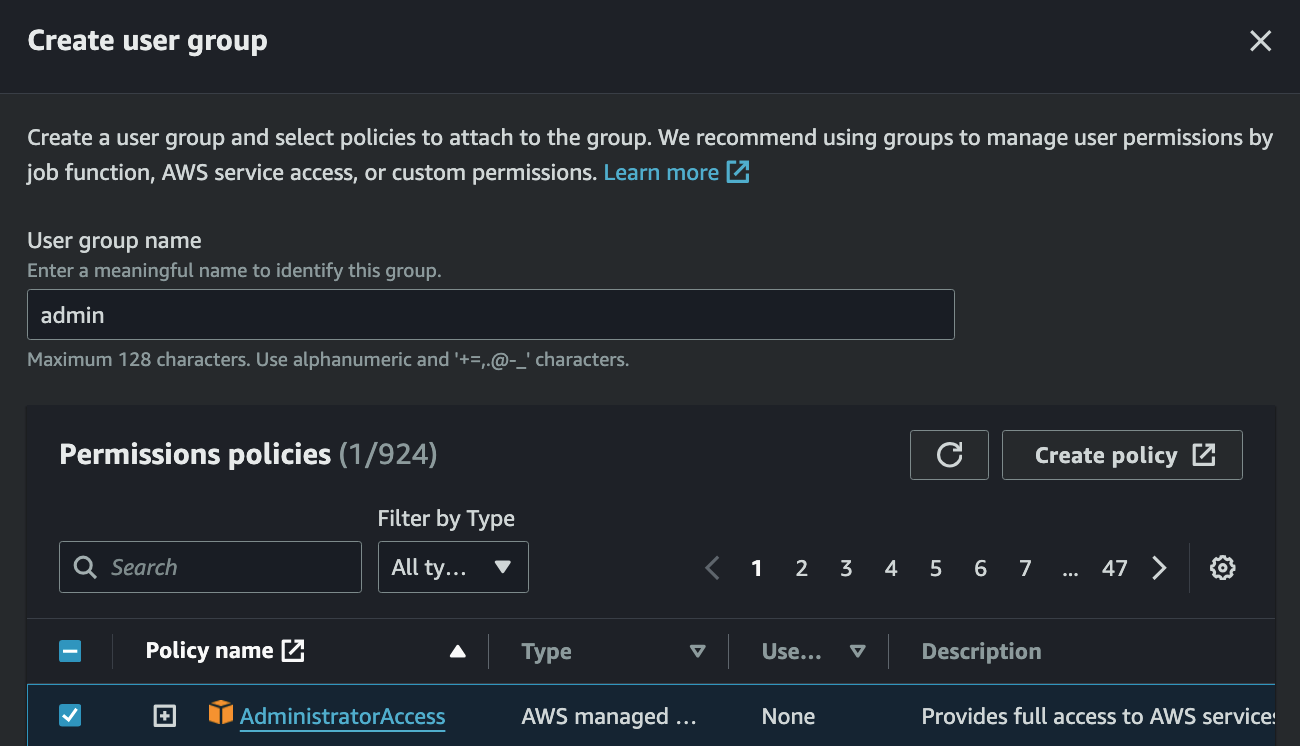
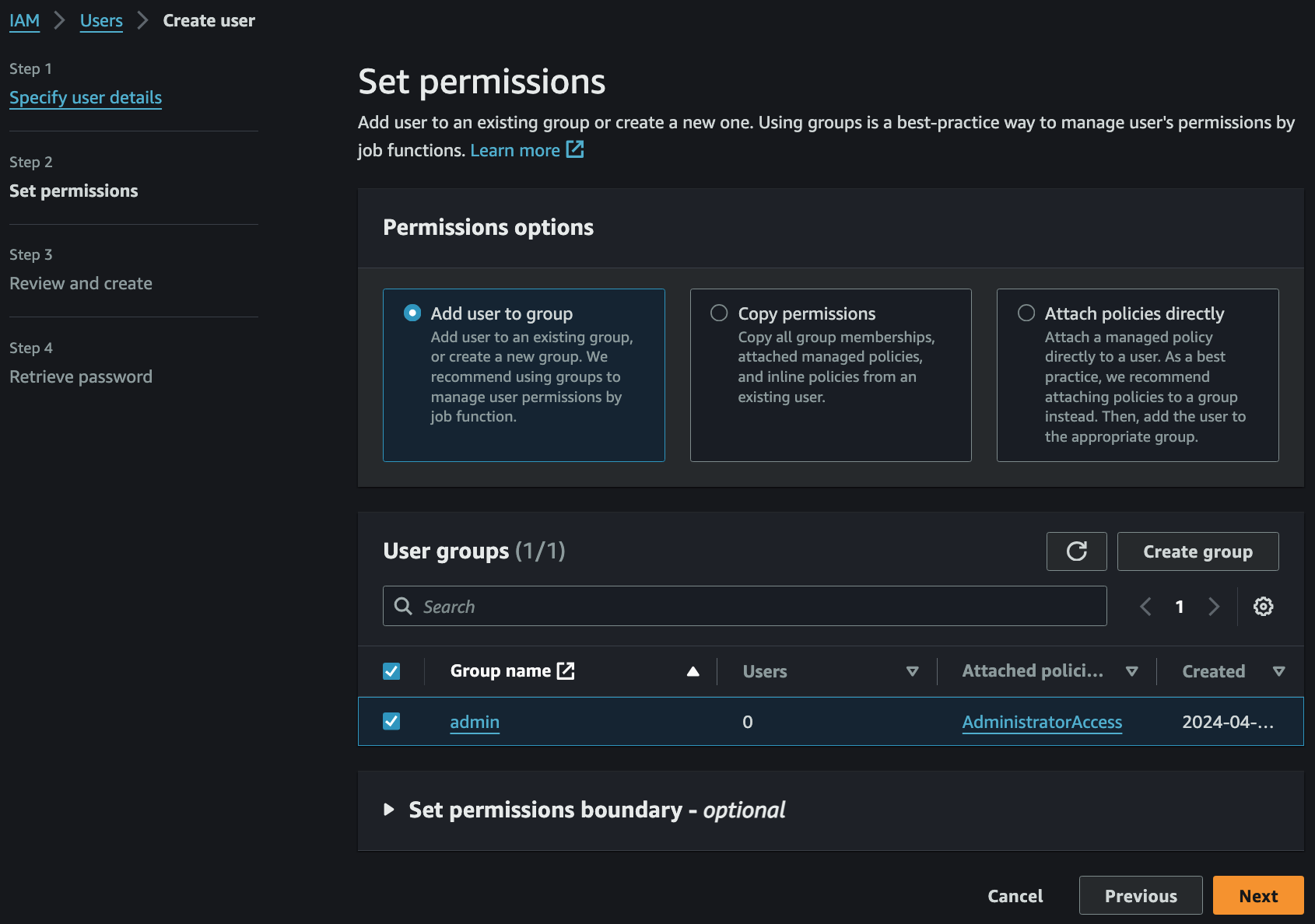
- Create group 으로 User 가 속할 Group 을 만들면서 동시에 Permission policies 까지 할당
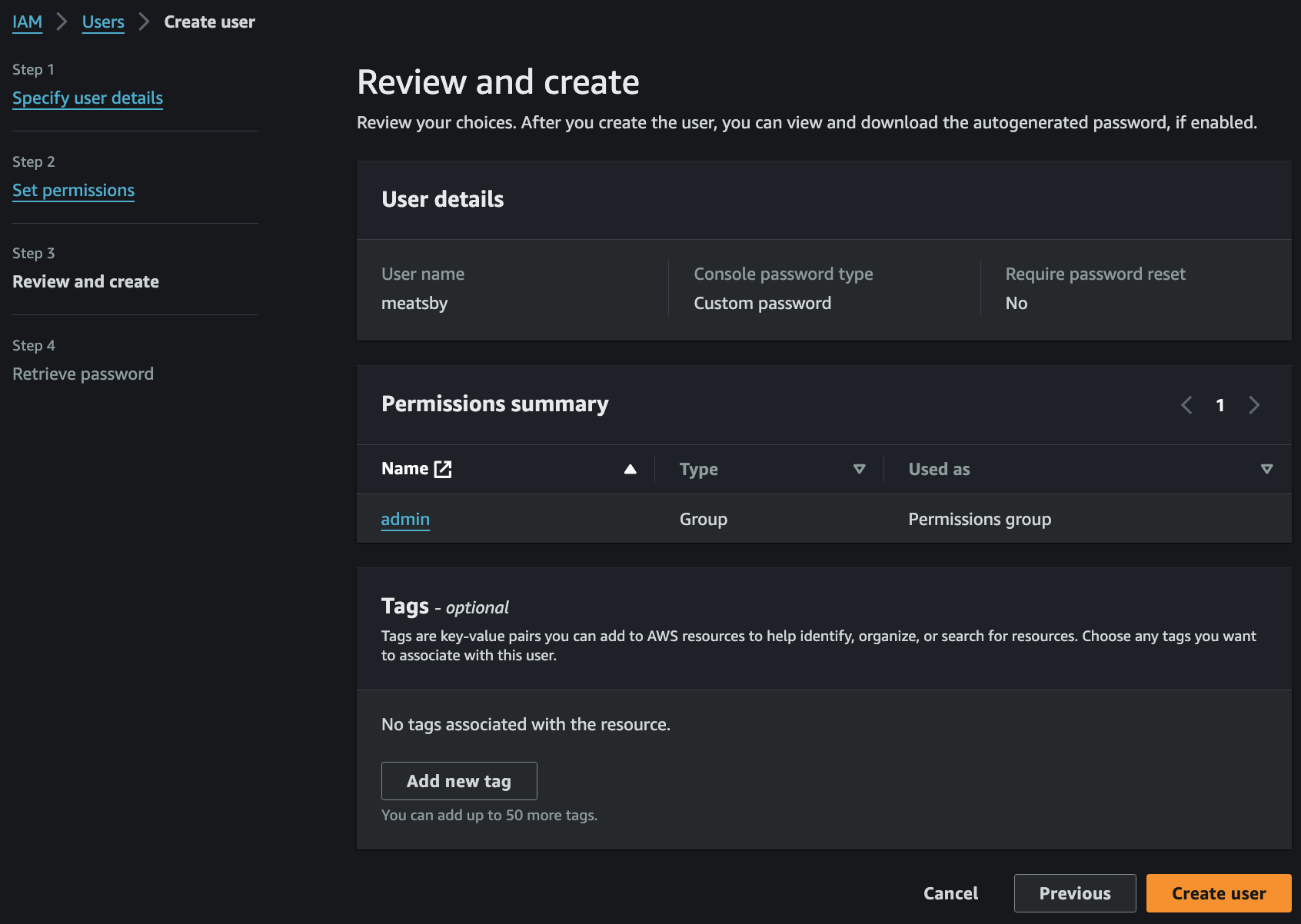
- 마지막 Review 후 Create user 클릭 시 User 생성 완료
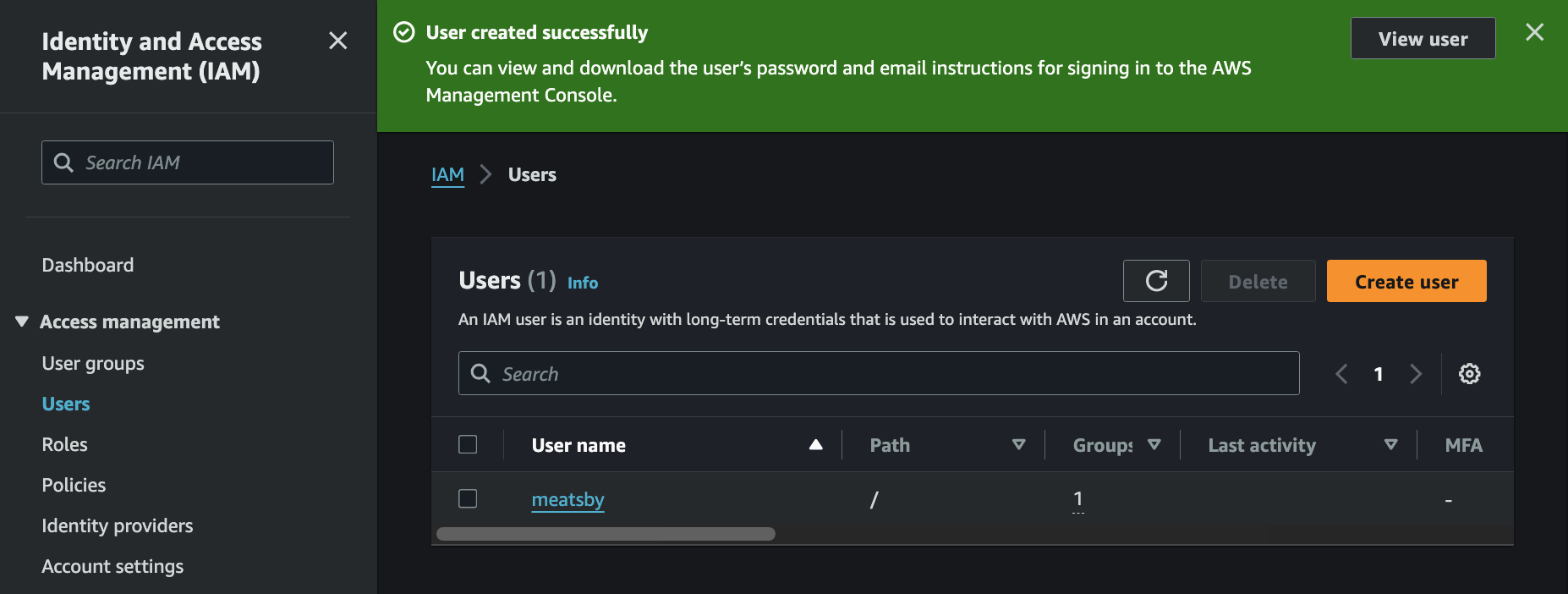
- Users 로 다시 돌아와보면 User 가 성공적으로 생성되어있는 것을 확인 가능
IAM User Access Key for AWS CLI
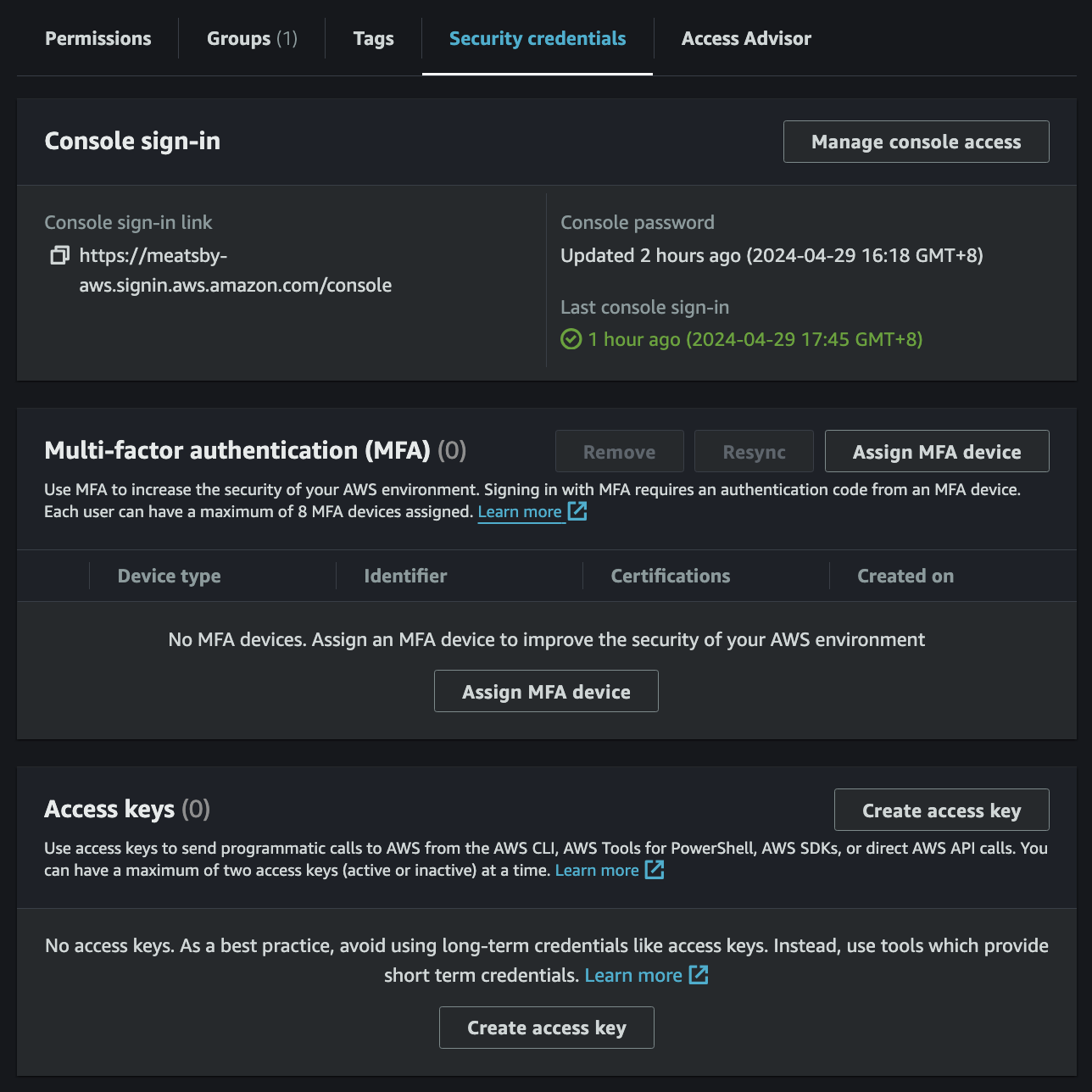
- AWS Management Console 에서 IAM -> Users -> User 선택 -> Security credentials 탭 -> Access keys 에서
Create access key
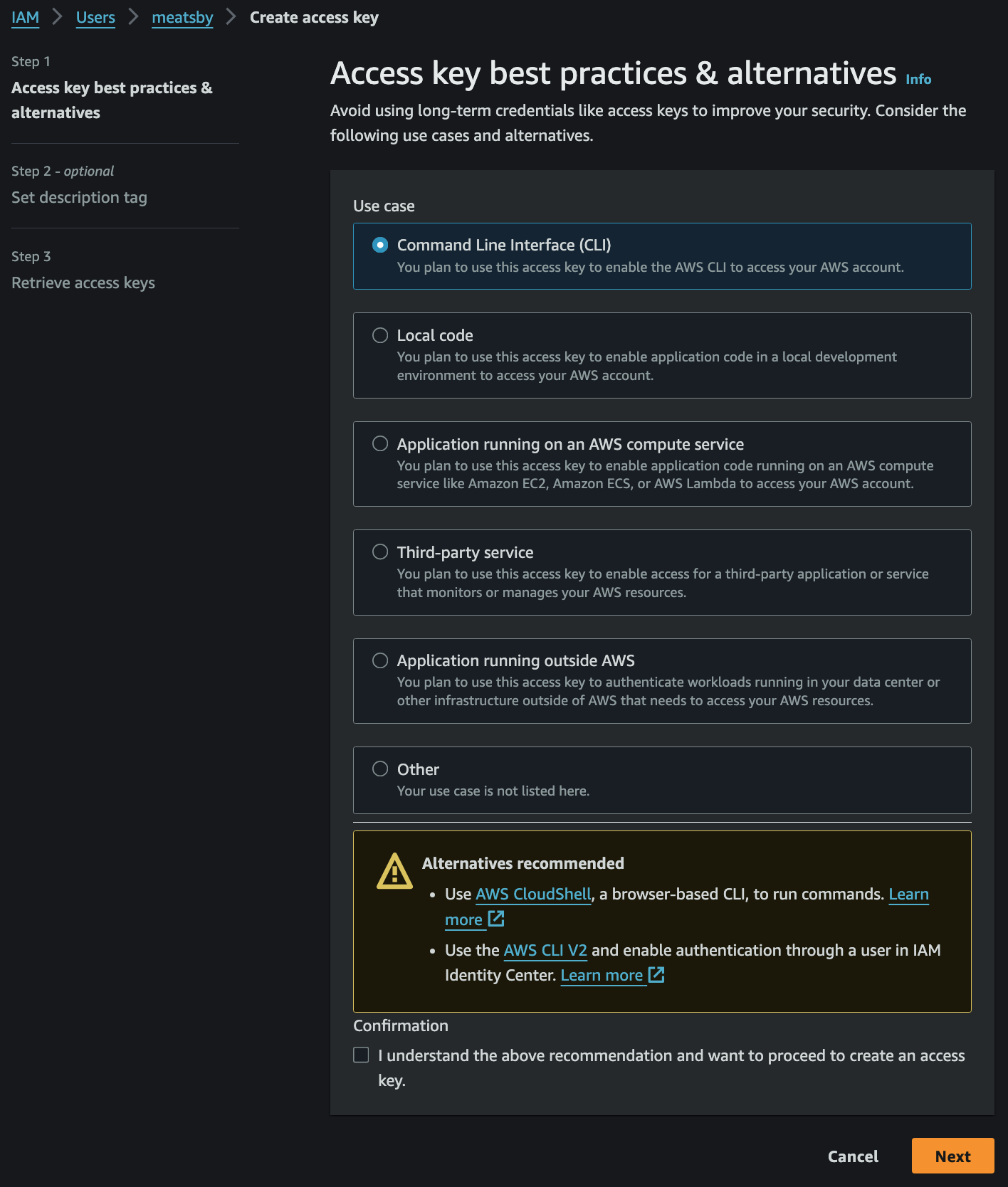
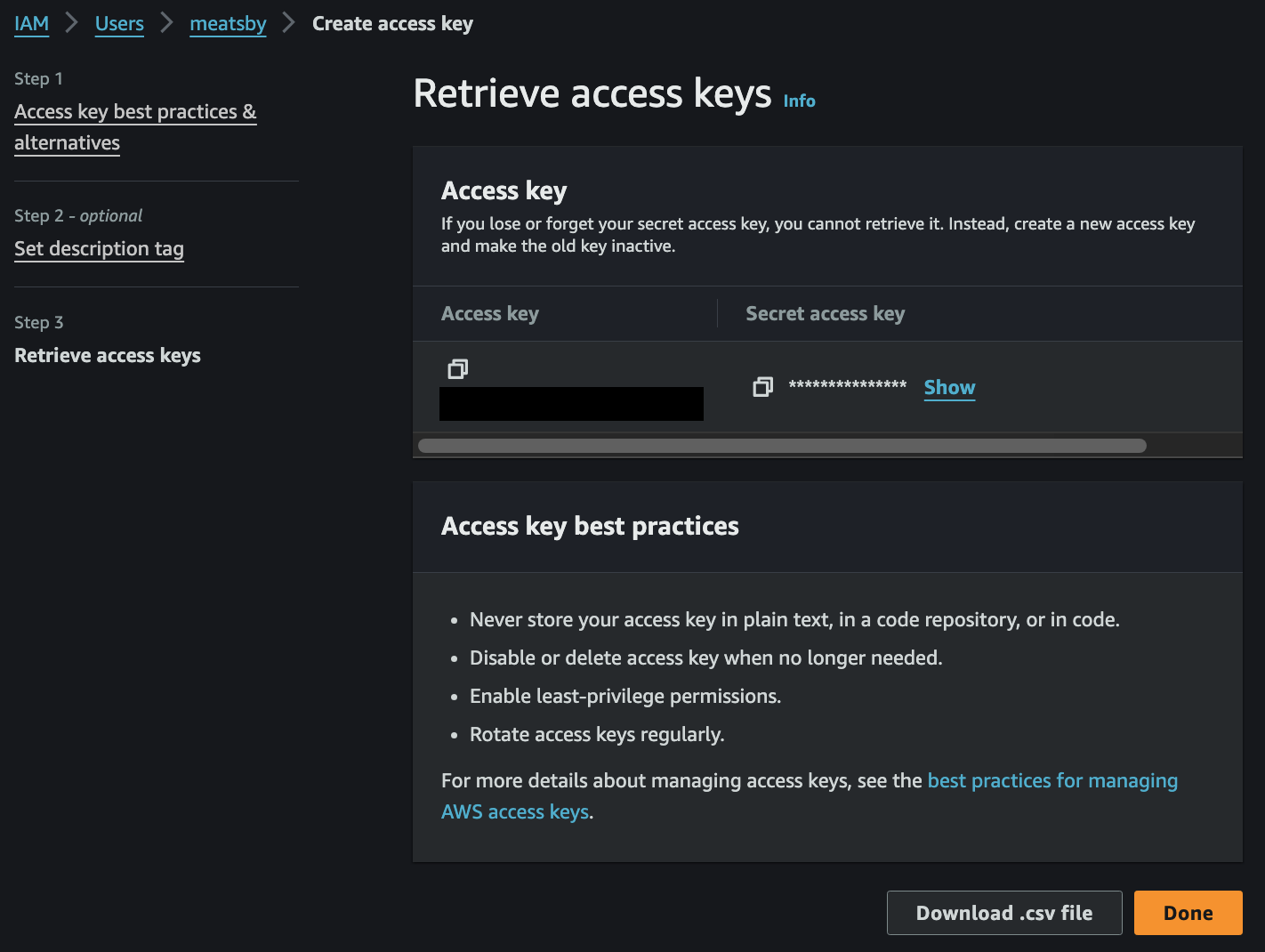
- CLI 선택후 마지막 화면이 Access Key 와 Secret Access Key 를 저장할 수 있는 유일한 시간
$ aws configure
AWS Access Key ID [None]: ACCESS_KEY
AWS Secret Access Key [None]: SECRET_ACCESS_KEY
Default region name [None]: ap-east-1
Default output format [None]:
aws configure명령어 입력 후 위와 같이 설정하면 CLI 로 AWS API 를 사용 가능- 단, EC2 인스턴스와 같이 타인이 접속할 수 있는 머신에서 이 방법을 쓰면 타인이 인스턴스에 입력된 자격 증명 정보를 회수할 수 있기 때문에 best practice 가 아님
- 따라서 EC2 에서 AWS API 를 사용하길 원할 경우 IAM Role 을 지정하는게 best practice
IAM Policies
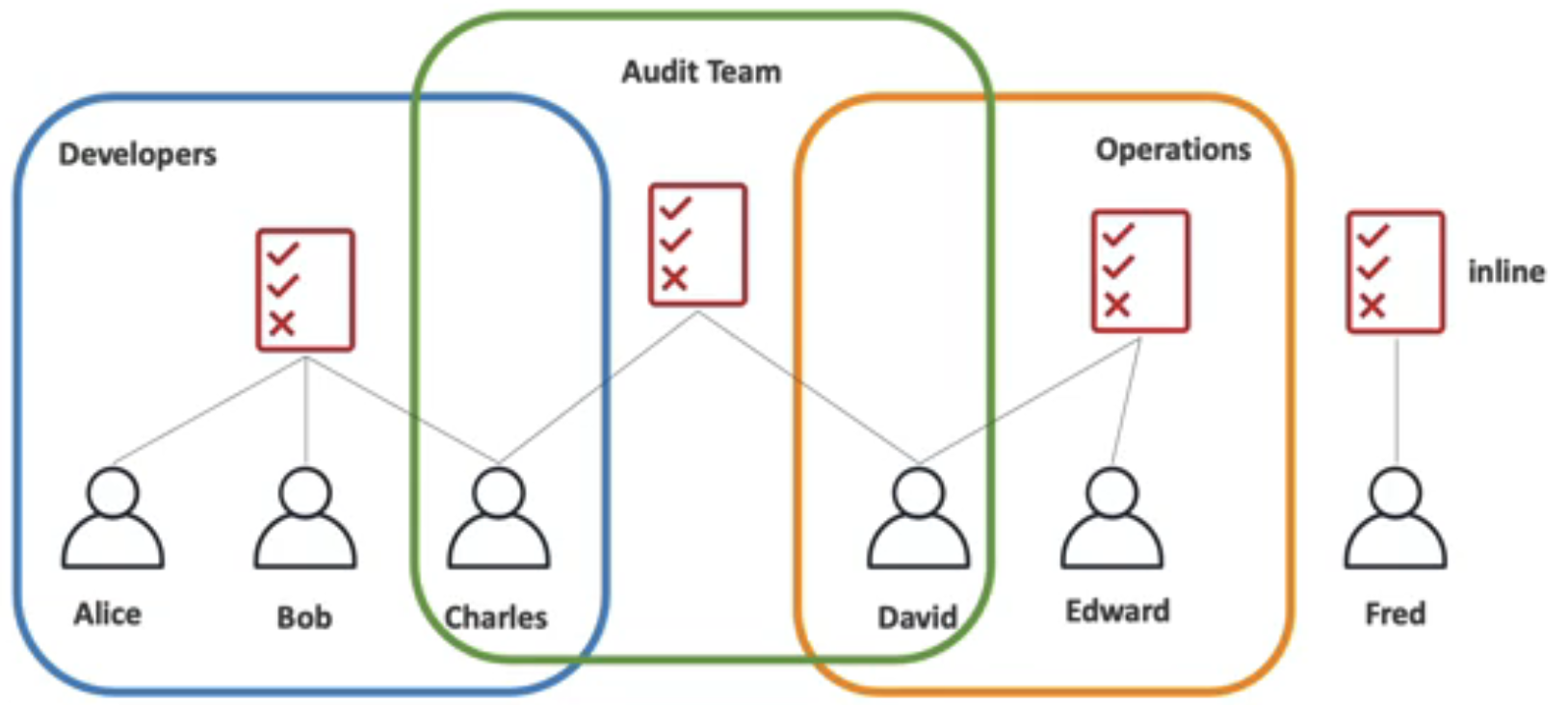
- IAM Policy is a JSON document that allows or denies permissions to AWS resources
- Follow the security
principle of least privilegewhen granting permissions - IAM Policy can be assigned to User Groups or User itself with inline-policy
- Follow the security
IAM Policies Structure
{
    "Version": "2012-10-17",
    "Statement": [
        {
            "Effect": "Allow",
            "Action": [
                "iam:GenerateCredentialReport",
                "iam:GenerateServiceLastAccessedDetails",
                "iam:Get*",
                "iam:List*",
                "iam:SimulateCustomPolicy",
                "iam:SimulatePrincipalPolicy"
            ],
            "Resource": "*"
        }
    ]
}Version: 정책 언어 버전 (Optional, 항상2012-10-17명시 권장)- 생략하면 policy variables 등 최신 문법을 사용할 수 없음
2008-10-17은 구버전이며 신규 정책에 사용하지 않음- Managed Policy 의 버전(
v1,v2…)과는 전혀 다른 개념
Id: 정책 식별자 (Optional)- SQS, SNS 등 일부 서비스는 필수이며 고유성을 요구
Statement: 하나 이상의 개별 statement (Required)Sid: statement 식별자 (Optional)Effect:Allow또는Deny(Required, default 없음)Principal: 이 정책이 적용되는 대상 (Account/User/Role) (Required in some circumstances)- Resource-based policy 에서는 필수
- Identity-based policy 에는 쓸 수 없음, attach 된 principal 이 곧 대상으로 암시(implied)되기 때문
Action: 정책이 허용하거나 거부하는 action 목록 (Required)Resource: action 이 적용되는 리소스 목록 (Required in some circumstances)- Identity-based policy 에서는 필수
- Resource-based policy 에서는 리소스에 따라 다름, S3 Bucket Policy 는 필수이고 Role Trust Policy 는 사용하지 않음
- 리소스 단위 지정을 지원하지 않는 action 은
*를 사용
Condition: 정책이 적용되는 조건 (Optional)
Action/NotAction,Principal/NotPrincipal,Resource/NotResource는 각각 상호 배타적이라 한 statement 에 함께 쓸 수 없음Statement:EffectPrincipaltoActiononResourcewhenCondition의 논리인 셈
IAM Policies 종류
- Identity-based policies: IAM Users, IAM User Groups, IAM Roles 에 적용하는 Policy
- Managed Policy: 독립된 IAM 객체로 ARN 을 가진다
- 여러 principal 에 attach 가능하고 버전 관리가 됨 (최대 5개, 그중 하나가 default version)
- AWS Managed Policy: AWS 에서 기본으로 제공하는 Policy, 여러 계정에서 동일한 Policy 사용 가능
- e.g.
arn:aws:iam::aws:policy/AmazonS3ReadOnlyAccess
- e.g.
- Customer Managed Policy: 사용자가 생성한 Custom Policy, 해당 Policy 가 생성된 계정만 사용 가능
- e.g.
arn:aws:iam::123456789012:policy/MyCustomPolicy
- e.g.
- Inline Policy: 특정 principal(user/group/role) 하나에 embed 되어 있다. ARN 이 없다
- 명시적으로 할당하는 1대1 Policy, principal 을 삭제하면 함께 사라짐
- 버전 관리가 없으며 재사용 불가
- 보통 Managed 를 사용하길 권장
- 명시적으로 특정 사용자에게 특정 권한을 부여하고 싶을 경우에 사용하면 유용
- Managed Policy: 독립된 IAM 객체로 ARN 을 가진다
- Resource-based policies: AWS Resource 에 적용하는 Policy, 대표적으로 S3 Bucket Policy 가 있음
- 항상 inline 이며 managed resource-based policy 는 존재하지 않음
- 정책이 리소스에 붙어 있으므로
Principal이 필수 - IAM Role 의 Trust Policy (
AssumeRolePolicyDocument) 도 resource-based policy 이며, 누가 이 Role 을 assume 할 수 있는지를 정의- IAM 이 지원하는 유일한 resource-based policy
- Role 은 identity 이면서 동시에 resource 이므로 Trust Policy 와 identity-based policy 를 모두 가짐
- Permissions boundaries: IAM entity 가 가질 수 있는 권한의 상한선을 정하는 managed policy
- 자체로는 권한을 부여하지 않으며, identity-based policy 와의 교집합만 유효
- Organizations SCPs: Organization 의 OU/계정에 적용하는 principal 중심 guardrail
- 멤버 계정의 IAM principal 이 가질 수 있는 최대 권한을 제한
- 권한을 부여하지 않으며, management 계정에는 적용되지 않음
- Organizations RCPs: 멤버 계정의 리소스에 적용하는 resource 중심 guardrail
- 주로 Organization 외부 principal 의 리소스 접근을 차단하는 데 사용
- SCP 와 마찬가지로 권한을 부여하지 않음
- Access control lists - ACLs: 다른 계정의 principal 이 리소스에 접근할 수 있는지를 제어, S3, WAF, VPC 등이 지원
- JSON policy 언어를 사용하지 않는 유일한 policy 타입
- 같은 계정 내 principal 에 대한 접근 제어에는 사용할 수 없음
- Session policies:
AssumeRole등으로 임시 세션 생성 시 파라미터로 전달하는 Policy- 해당 세션에 한해 권한을 좁히며, Role 의 권한과의 교집합만 유효
IAM Roles
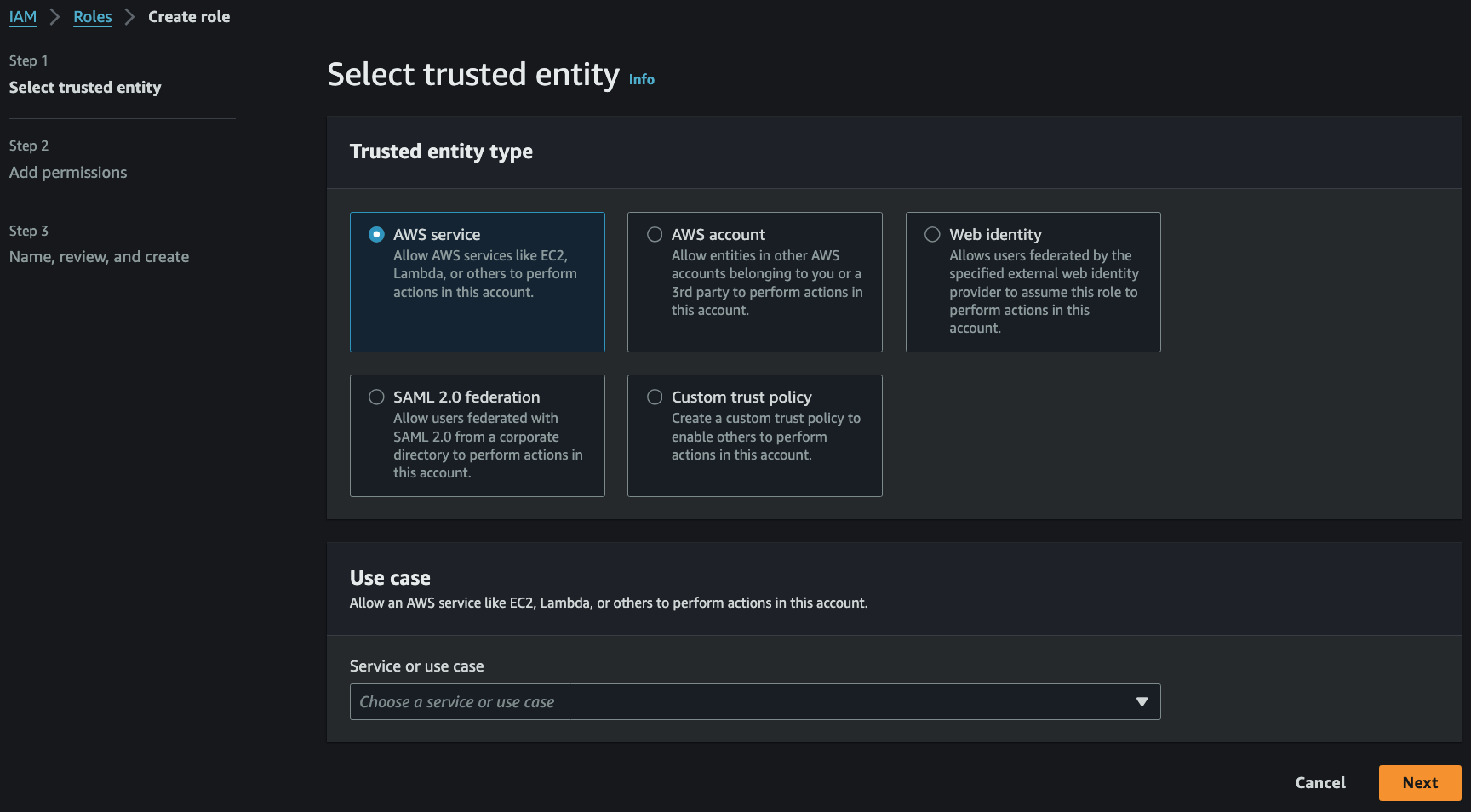
- IAM Role 은 AWS Services 를 위한 IAM User 라고 생각할 수 있음
- An identity that you can assume to gain
temporary accessto permissions - Ideal for situations in which access to services or resources needs to be granted
temporarily, instead of long-term - To grant users in one AWS account access to resources in another AWS account
- IAM Users 의 권한을 쉽게 관리하기 위해 IAM User Groups 를 사용하는데, 권한이 다양해지면 관리가 복잡해지고 이를 해결하기 위해 IAM Roles 를 사용
- User Group 에 권한을 바로 부여하는 대신, Role 을 만들고 User 또는 User Group 에 할당
- 임시 세션토큰을 발급하여 일시적인 권한을 위임
Trust Policy
- Role 은 두 종류의 Policy 를 동시에 가짐
- Permission policy (identity-based): 이 Role 이 무엇을 할 수 있는가
- Trust policy (resource-based): 누가 이 Role 을 assume 할 수 있는가
- Trust policy 는 Role 의
AssumeRolePolicyDocument속성으로 저장되며GetRole로만 조회 가능ListAttachedRolePolicies와ListRolePolicies는 permission policy 만 반환하므로 Role 감사 시GetRole이 필요
- Role 자신이 곧 리소스이므로
Resource를 쓰지 않고, action 은sts:AssumeRole을 지정 Principal의typeAWS: 다른 계정 또는 같은 계정의 IAM User/RoleService: AWS 서비스 (e.g.ec2.amazonaws.com,lambda.amazonaws.com)Federated: SAML/OIDC IdP (e.g. EKS IRSA, GitHub Actions OIDC)
Terraform Code 예시
# AssumeRolePolicyDocument (trust policy). aws_iam_role.assume_role_policy 의 인자
data "aws_iam_policy_document" "trust" {
  statement {
    sid     = "TrustRelationship"
    effect  = "Allow"
    actions = ["sts:AssumeRole"]

    principals {
      type        = "AWS"
      identifiers = ["arn:aws:iam::XXXXXXXXXXXX:role/staff-aws-audit-org-read-role"]
    }
    # resources 없음 — 아래 Role 자신이 리소스
  }
}

resource "aws_iam_role" "audit" {
  name               = "system-aws-audit-iam-read-role"
  assume_role_policy = data.aws_iam_policy_document.trust.json  # Required
}

# AttachedManagedPolicies 중 AWS Managed. "aws_iam_role_policy_attachment" (ARN 참조만)
resource "aws_iam_role_policy_attachment" "security_audit" {
  role       = aws_iam_role.audit.name
  policy_arn = "arn:aws:iam::aws:policy/SecurityAudit"
}

# AttachedManagedPolicies 중 Customer Managed. "aws_iam_policy" 로 객체 생성 후 attach
data "aws_iam_policy_document" "iam_read" {
  statement {
    sid       = "IAMReadAccess"
    effect    = "Allow"
    actions   = ["iam:ListRoles", "iam:ListUsers", "iam:ListPolicies"]
    resources = ["*"]
    # principals 없음 — attach 되는 Role 이 곧 principal
  }
}

resource "aws_iam_policy" "iam_read" {
  name   = "system-aws-audit-iam-read-policy"
  policy = data.aws_iam_policy_document.iam_read.json
  # arn:aws:iam::111122223333:policy/system-aws-audit-iam-read-policy
}

resource "aws_iam_role_policy_attachment" "iam_read" {
  role       = aws_iam_role.audit.name
  policy_arn = aws_iam_policy.iam_read.arn
}

# RolePolicyList (inline policies). "aws_iam_role_policy" (Role 에 직접 embed, ARN 없음)
data "aws_iam_policy_document" "deny_self_modify" {
  statement {
    sid       = "DenySelfModification"
    effect    = "Deny"
    actions   = ["iam:*"]
    resources = [aws_iam_role.audit.arn]
  }
}

resource "aws_iam_role_policy" "deny_self_modify" {
  name   = "deny-self-modification"
  role   = aws_iam_role.audit.id
  policy = data.aws_iam_policy_document.deny_self_modify.json
}
IAM Security Tools
IAM Credential Reports (account-level)
- AWS Management Console 에서 IAM -> Credential report -> Download Report
- A report that lists all account’s users and the status of their various credentials
IAM Access Advisor (user-level)
- AWS Management Console 에서 IAM -> Users -> User 선택 -> Access Advisor 탭
- 어떤 AWS Services 에 마지막으로 접근했는지 확인 가능
- 접근하지 않는 Resources 는 제한하여
principle of least privilege를 지킬 수 있음
- 접근하지 않는 Resources 는 제한하여
IAM 권한 검증 절차
IAM User 가 S3 를 사용하고 싶은 경우
- IAM User 에게 S3 사용 Policy 가 부여되었는가?
- IAM User 가 속한 IAM User Group 에 S3 사용 Policy 가 부여되었는가?
- IAM User 에게 위임된 Role 에 S3 사용 Policy 가 부여되었는가?
- OK 또는 Fail
Lambda 가 S3 를 이용하고 싶은 경우
- Lambda 에 S3 사용 Role 이 부여되었는가?
- OK 또는 Fail
- IAM Access Analyzer
Identifieswhether an Amazon S3 bucket or an IAM role has beensharedwith anexternal entitysuch asanother AWS account- Checks access policies and offers actionable recommendations to help users set secure and functional policies
- IAM Credential Report
- To
auditits password and access key rotation details forcompliancepurposes
- To
- AWS Security Token Service (STS)
- To request
temporary,limited-privilegecredentials for users
- To request
IAM Conditions
aws:SourceIp
{
    "Version": "2012-10-17",
    "Statement": [
        {
            "Effect": "Deny",
            "Action": "*",
            "Resource": "*",
            "Condition": {
	            "NotIpAddress": {
		            "aws:SourceIp": [
			            "192.0.2.0/24",
			            "203.0.113.0/24"
		            ]
	            }
            }
        }
    ]
}- Restrict the client IP from which the API calls are being made
aws:RequestedRegion
{
    "Version": "2012-10-17",
    "Statement": [
        {
            "Effect": "Deny",
            "Action": "*",
            "Resource": "*",
            "Condition": {
	            "StringEquals": {
		            "aws:RequestedRegion": [
			            "eu-central-1",
			            "eu-west-1"
		            ]
	            }
            }
        }
    ]
}- Restrict the Region the API calls are made to
ec2:ResourceTag
{
    "Version": "2012-10-17",
    "Statement": [
        {
            "Effect": "Allow",
            "Action": "*",
            "Resource": "*",
            "Condition": {
	            "StringEquals": {
		            "aws:ResourceTag/Project": "DataAnalytics"
	            }
            }
        }
    ]
}- Restrict based on tags
aws:MultiFactorAuthPresent
{
    "Version": "2012-10-17",
    "Statement": [
        {
            "Effect": "Deny",
            "Action": "*",
            "Resource": "*",
            "Condition": {
	            "BoolIfExists": {
		            "aws:MultiFactorAuthPresent": false
	            }
            }
        }
    ]
}- To force MFA
IAM for S3
s3:ListBucketpermission applies toarn:aws:s3:::test- Bucket level permission
s3:GetObjectpermission applies toarn:aws:s3:::test/*- Object level permission
Resource Policies & aws:PrincipalOrgID
aws:PrincipalOrgIDcan be used in any resource policies to restrict access to accounts that are members of an AWS Organization
IAM Role vs Resource-Based Policies
- In Cross-Account situation
- Resource-Based Policy can be attached to a resource (e.g. S3 bucket policy)
- OR use a Role as a proxy
- When using Assume Role, original permissions will not work
- When using Resource-Based Policy, resource allows given permissions
Amazon EventBridge - Security
- When a rule runs, it needs permissions on the target
- Resource-Based Policy: Lambda, SNS, SQS, CloudWatch Logs, API Gateway, …
- IAM Role: Kinesis Stream, Systems Manager Run Command, ECS task, …
IAM Permission Boundaries
- IAM Permission Boundaries are supported for users and roles (not group)
- Advanced feature to use a managed policy to set the maximum permissions an IAM entity can get
- Can be used in combinations of AWS Org SCP