EC2 란
- EC2(Elastic Compute Cloud) 란 Regional IaaS 서비스로 아래와 같은 구성요소로 이루어져 있음
- EC2
- EBS
- ELB
- ASG
- EC2 를 대여할 때 아래 사항들을 지정할 수 있음
- OS: Linux, Windows, Mac OS
- CPU
- RAM
- Storage
- Network-attached: EBS & EFS
- Hardware: EC2 Instance Store
- It has better I/O performance since it’s physically attached
- Network Card
- Speed of the card
- Public IP address
- Firewall Rules: Security Group
- Bootstrap Script(Configure at first launch): EC2 User Data
- Runs on top of physical host machines managed by AWS using virtualization technology
- A hypervisor running on the host machine is responsible for:
- Sharing the underlying physical resources between the virtual machines
- Coordinating this multitenancy
- Isolating the virtual machines from each other as they share resources from the host
- 서버를 Application 수요에 따라 탄력적으로 확장 가능
- DR features: AMIs, EBS snapshots
- Advantages
- Integration with VPC, CloudTrail, IAM
- Flexible, pay-as-you-go pricing model
- Amazon EC2 Pricing
- On-Demand: You pay for only the compute time you use
- Reserved Instances:
1-year or 3-year term- Standard: Fixed EC2 type & Region
- Convertible: Unfixed EC2 type & Region
- EC2 Instance Savings Plans
- Provides a discount when you make an
hourly spend commitmentto an instance family and Region for a1-year or 3-year term
- Provides a discount when you make an
- Spot Instances
- Use unused EC2 computing capacity and offer you cost savings at up to 90% off of On-Demand prices
- Dedicated Hosts
Physical serverswith EC2 instance capacity that is fully dedicated to your use
- Elastic Load Balancer
- Service that automatically distributes incoming application traffic across multiple resources
- Application Load Balancer (L7: HTTP/HTTPS Routing)
- Network Load Balancer (L4: TCP Routing)
Application and OS Images (Amazon Machine Image)
.png)
- AMI 는 EC2 instance 의 customization
- Software, OS 등을 미리 설치하고 이미지화 해둘 수 있음
- 각 Region 에는 고유한 AMI 가 있음
- 다른 Region 에서 AMI 를 사용하고 싶을 경우 복사 후 사용
- Amazon Linux AMI 엔 aws-cli 가 기본으로 설치되어 있음
Instance Type
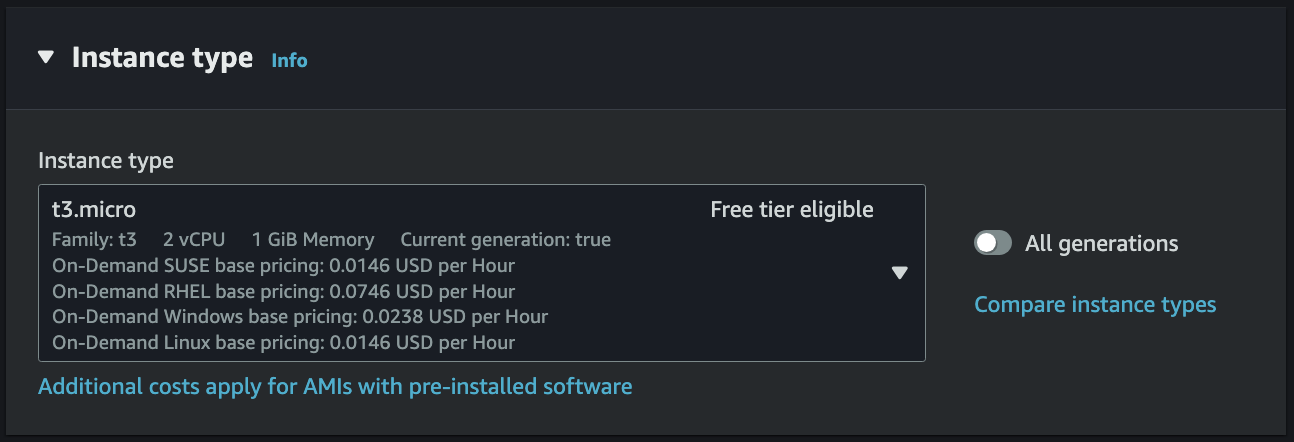
- Instance Type 이란 EC2 인스턴스의 사양으로 아래 네이밍 컨벤션을 따름
t3.microt: Instance Class3: Generationmicro: Size within the instance class
- Instance Type Variations
- General Purpose
- Compute, Memory, Networking 이 밸런스 잡힌 타입
t-family,m-family등이 해당됨
- Compute Optimized
- High performance 가 요구되는 작업을 수행할 때 사용
- Batch processing, Media transcoding, Gaming server 등
c-family가 해당됨
- High performance 가 요구되는 작업을 수행할 때 사용
- Memory Optimized
- 메모리에서 대규모 데이터셋을 처리할 때 사용
- High-performance RDB/non-RDB, Distributed web-scale cache store 등
r-family,x-family등이 해당됨
- 메모리에서 대규모 데이터셋을 처리할 때 사용
- Storage Optimized
- 로컬 스토리지의 대규모 데이터셋에 접근할 때 사용
- RDB, NoSQL, Cache for in-memory DB(Redis) 등
i-family,d-family,h-family등이 해당됨
- 로컬 스토리지의 대규모 데이터셋에 접근할 때 사용
- General Purpose
Key Pair (Login)
.png)
- 인스턴스에 접근하기 위해 SSH 를 이용할 때 필요한 Key Pair 생성
- Mac, Linux, Windows 10 이면 .pem 형식 사용 가능
- Windows 10 미만 버전이면 .ppk 사용
Network Settings
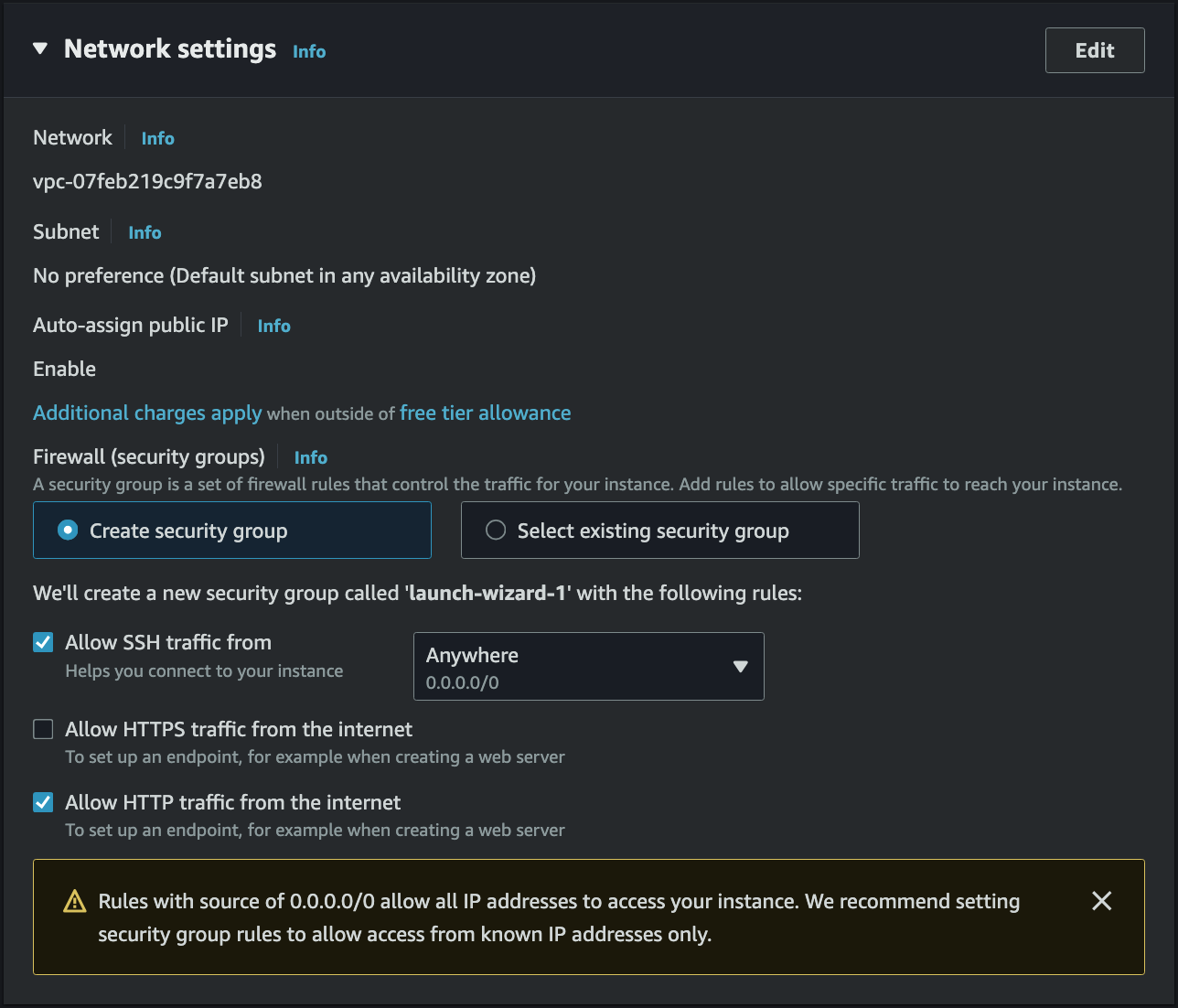
- 인스턴스가 위치할 VPC, Subnet 설정
- 인스턴스에게 공용 IP 할당 여부
- Security Group 으로 Firewall 설정
Security Group
- A
Statefulvirtual firewall that controls inbound and outbound traffic for anEC2 - It’s a Regional VPC service that lives outside the EC2
- This means any blocked traffic cannot be seen inside the EC2 instance
- Security Group can be attached to multiple instances
- By
default, itdenies all inboundtraffic andallows all outboundtraffic - Security Group rules can reference
IP & portsorother Security Groupto control access Not accessible (time out): Security Group issueConnection refused: Application error or instance is not launched
Classic Ports to know
- 22 = SSH (Secure Shell) - Log into a Linux instance
- 21 = FTP (File Transfer Protocol) - Upload files
- 22 = SFTP (Secure File Transfer Protocol) - Upload files using SSH
- 80 = HTTP
- 443 = HTTPS
- 3389 = RDP (Remote Desktop Protocol) - Log into a Windows instance
EIP, Elastic IP
- EC2 는 기본적으로 Public IP 와 Private IP 를 할당받음
- Public IP = 인터넷과 통신하기 위한 IP
- SSH 사용 시 Public IP 로 접속
- Google 검색으로 geo-location 을 쉽게 찾을 수 있음
- Elastic IP 를 통해 Public IP 를 고정으로 사용 가능
- Private IP = 내부망과 통신하기 위한 IP
- VPN 을 쓰면 SSH 로 접속 가능
- Internet Gateway 를 통해 인터넷과 통신 가능
- 특정 범위의 IP 만 Private IP 로 사용 가능
- Public IP = 인터넷과 통신하기 위한 IP
ENI, Elastic Network Interface
- ENI 는 VPC 에서 virtual network card 를 나타내는 logical component. 즉, EC2 의 가상의 랜카드이다.
- IP 주소와 MAC 주소를 보유한다.
- ENI 하나 당 Private IP + 하나의 Public IP(Optional)
- 필요에 따라서 여러개의 Private IP 부여 가능
- EC2 는 반드시 하나 이상의 ENI 가 연결되어 있다.
- 제일 처음 EC2 를 생성할 때 Primary ENI 가 생성되어 연결된다.
- 즉, 하나의 EC2 는 하나 이상의 ENI 를 보유할 수 있다.
- 추가적인 ENI 의 경우 EC2 와 같은 AZ 이면 다른 서브넷에도 설정할 수 있다.
- ENI 는 특정 AZ 에 종속된다.
- 보안그룹 적용은 ENI 단위다.
- 즉, 하나의 인스턴스에 다양한 보안그룹으로 구성된 경로를 적용할 수 있다.
- 예를 들어, Subnet A 에서는 80만 허용, Subnet B 에서는 22만 허용
- Private IP 하나 당 1 EIP 혹은 Public IP 가 할당된다.
- EC2 Public IP 는 ENI 가 아닌 가상의 Public IP <-> Private IP 테이블로 관리된다.
- 이 레코드는 EIP 로 고정하지 않는 이상 영구적인 레코드가 아니다.
- EC2 중지 -> 재부팅 시 Public IP 가 바뀌는 이유다.
- 인터넷에서 Public IP 로 통신이 전달되면 IGW 가 테이블을 통해 변환 후 전달한다.
Storage (Volumes)
.png) EC2 인스턴스 생성 시 기본적으로 Amazon EBS Root volume 으로 함께 생성된다. 추가적인 Storage 조건이 필요한 경우 추가 EBS 또는 Amazon EFS 를 마운팅하여 사용할 수 있다.
EC2 인스턴스 생성 시 기본적으로 Amazon EBS Root volume 으로 함께 생성된다. 추가적인 Storage 조건이 필요한 경우 추가 EBS 또는 Amazon EFS 를 마운팅하여 사용할 수 있다.
Advanced Details
IAM Instance Profile
- EC2 Instance 에 IAM Role 을 할당할 때 사용하는 설정
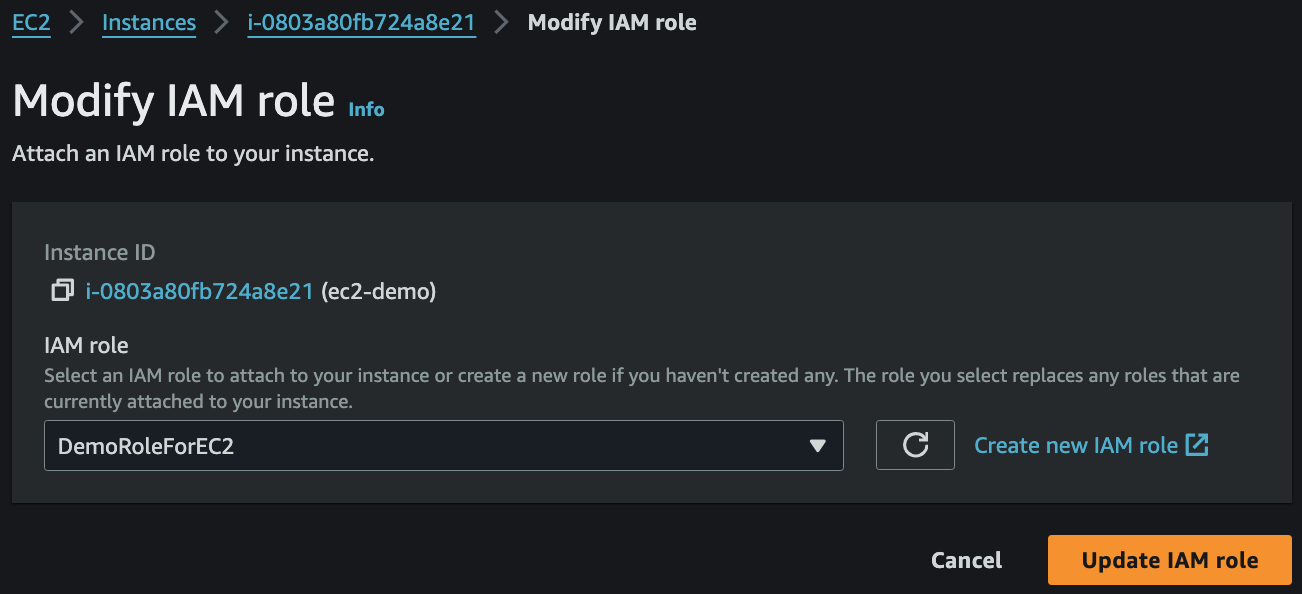
- 생성 시 할당하지 않았더라도 Actions -> Security -> Modify IAM role 을 통해 IAM Role 을 할당할 수 있음
EC2 Hibernate

- EC2 Hibernate 은 절전모드로 RAM state 을 root EBS volume 에 저장하는 상태
- 재부팅 시 RAM state 을 그대로 불러올 수 있음
- 전에 부팅한 상태라면 새로 부팅할 필요가 없어 부팅 시간이 단축됨
- RAM size must be less than 150GB
- Not supported for bare metal instances
- Root volume must be
EBS,encrypted, not instance store, and large enough to store RAM - Available for On-Demand, Reserved, and Spot instances
- An instance cannot be hibernated for more than 60 days
User Data
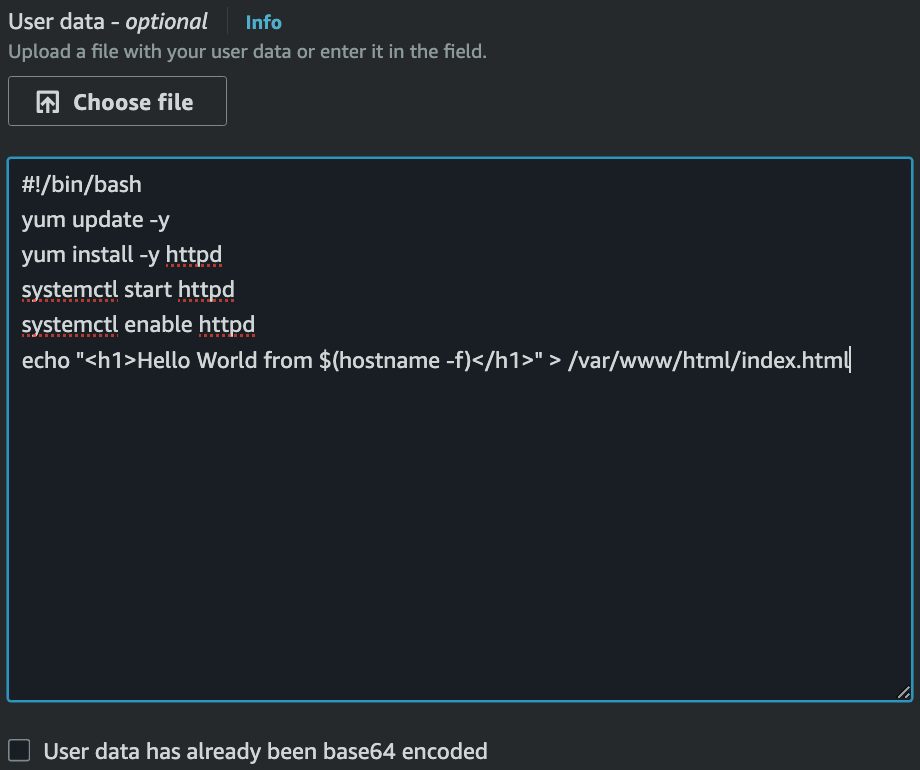
- EC2 인스턴스가 생성되면서 최초에 실행되는 script (Bootstrapping)
- 모든 명령어는 Root User 로 실행되기 때문에
sudo필수
- 모든 명령어는 Root User 로 실행되기 때문에
- 생성 시 Advanced Details 에서 작성 가능
- 제일 윗 줄에
#!/bin/bash필수
- 제일 윗 줄에
cat /var/log/cloud-init-output.log로 script 실행 로그 확인 가능
IMDS, Instance Metadata Service
- 인스턴스가 자기 자신의 정보를 HTTP 로 조회하는 서비스다
- 인스턴스 ID, 인스턴스 타입, AZ, Private IP, SSH 공개키, User Data 등을 제공한다
- IAM Instance Profile 의 STS 임시 자격증명도
/latest/meta-data/iam/security-credentials/<role>로 제공되며, SDK/CLI 는 이 경로에서 자격증명을 자동으로 읽는다 - cloud-init 은 첫 부팅 시
/latest/meta-data/public-keys/에서 SSH 공개키를 받아authorized_keys에 기록한다
- 엔드포인트 =
http://169.254.169.254(IPv6http://[fd00:ec2::254]는 IPv6 서브넷의 Nitro 인스턴스에서 별도 활성화)169.254.0.0/16은 link-local 대역으로 라우터를 넘지 않는다- 요청은 VPC 네트워크로 나가지 않고 인스턴스 로컬에서 응답되며, 게스트 OS 안의 프로세스가 아니다
- 경로:
/latest/meta-data/,/latest/dynamic/,/latest/user-data
# IMDSv1
curl http://169.254.169.254/latest/meta-data/instance-id

# IMDSv2
TOKEN=$(curl -X PUT "http://169.254.169.254/latest/api/token" \
  -H "X-aws-ec2-metadata-token-ttl-seconds: 21600")
curl -H "X-aws-ec2-metadata-token: $TOKEN" http://169.254.169.254/latest/meta-data/instance-id- IMDSv1 = GET 한 번으로 응답받는 요청/응답 방식
- 인스턴스 위의 앱이나 WAF, 프록시가 외부 요청을 IMDS 로 relay 하면 Role 자격증명이 그대로 유출된다
- e.g. 2019년 Capital One 유출 사고
- EC2 위에서 잘못 설정된 ModSecurity WAF 가 공격자 요청을 IMDS 로 relay
- WAF 에 붙은 Role 의 임시 자격증명을 획득
- Role 권한이 과도해 S3 버킷 목록 조회와 객체 읽기가 가능했고, 1억 건 이상의 신용카드 신청 정보가 유출
- IMDSv2 = PUT 으로 세션 토큰을 받고, 이후 모든 GET 에 토큰을 헤더로 첨부하는 세션 방식 (2019년 11월 출시)
- 토큰은 비밀값으로 IMDS 에 보관되지 않으며 이후 호출로 다시 조회할 수 없다
- 토큰 TTL 은 1초 ~ 6시간(21600초)이며 만료된 토큰은
401 - 토큰은 발급된 인스턴스에서만 유효하다
- 발급 절차가 네 가지 취약점 유형에서 토큰을 얻지 못하게 막는다
- Open WAF: 대부분의 WAF 는 PUT 요청을 relay 하지 않으므로 세션 시작 단계에서 차단
- Open reverse proxy: PUT 이 드물고,
X-Forwarded-For헤더가 있는 요청에는 토큰을 발급하지 않음 - SSRF: 헤더까지 조작 가능한 SSRF 도 많아 정적 헤더만으로는 부족하며, PUT 세션 시작 + 토큰 요구 조합이 대부분을 차단
- Open L3 firewall, NAT, VPN: PUT 응답 패킷의 IP TTL = 1 이라 인스턴스가 다른 곳으로 forward 하면 TTL 이 0 이 되어 폐기됨
- IMDS 토큰은 AWS 자격증명이 아니다. 토큰은 IMDS 조회용이고, 토큰으로 꺼낸
security-credentials가 AWS API 호출용이다
Hop Limit
HttpPutResponseHopLimit= PUT(토큰) 응답 패킷에 찍히는 IP TTL 값, 범위 1~64, 기본 1- 리눅스 커널 파라미터가 아니라 EC2 인스턴스 속성이며, IMDS 가 응답 패킷에 이 값을 찍는다
- 컨테이너는 별도 network namespace 라 노드 커널의 forward 가 한 홉으로 잡힌다
- hop limit 1 이면 토큰 응답이 컨테이너에 도달하지 못하므로 2 로 설정한다
hostNetworkPod 는 forward 가 없어 1 이어도 된다- EKS Managed Node Group 문서
- “If any containers that you deploy to the node group use the Instance Metadata Service Version 2, make sure to set the Metadata response hop limit to 2 in your launch template.”
- “For any AMI that uses a custom launch template, the default HttpPutResponseHopLimit for managed node groups is set to 2.”
- 설정 우선순위: 인스턴스 시작 시 값(Launch Template 등) > 계정 기본값(리전별) > AMI
- AMI 를
imds-support v2.0으로 등록하면 IMDSv2 required, hop limit 2 가 기본으로 적용된다 - 계정 기본값이 hop limit 1 이면 AMI 의 2 보다 우선한다
- AMI 를
- 실행 중인 인스턴스 변경:
aws ec2 modify-instance-metadata-options --instance-id <id> --http-put-response-hop-limit 2
주의점
- link-local 서비스(IMDS, Route 53 Resolver, NTP 등) 합산 1024 PPS 제한이 있다
- 자격증명은 매 요청마다 조회하지 말고 만료 전까지 캐시하며, throttling 시 지수 백오프로 재시도한다
- curl 은 IMDS 가 오류를 반환해도 성공 종료 코드를 내므로 스크립트에서는
curl -f를 사용한다
ELB, Elastic Load Balancing
- ELB 란 다수의 리소스에 트래픽을 분산 시켜주는 서비스다.
- 총 4가지 종류가 있다.
- ALB (L7: HTTP/HTTPS Routing)
- NLB (L4: TCP Routing)
- CLB
- GLB
- 직접 트래픽을 발생시켜 인스턴스 Health Check 를 수행한다.
- Autoscaling 과 연동할 수 있다.
- 지속적으로 IP 주소가 바뀌며 IP 고정이 불가능하다. 때문에 항상 도메인 기반으로 사용된다.
- 새벽마다 502 가 뜨는데 서버는 멀쩡한 경우
- ALB default keep-alive 는 60초
- Gunicorn default keep-alive 는 2초
- 커넥션을 서버가 먼저 끊어서 502 발생
- 서버 keep-alive 설정을 LB 보다 길게 가져가면 해결 가능
- NLB default keep-alive 는 350초
- Load Balancer forwards traffic to multiple servers
- Expose a Single Point of Access (DNS)
- HTTPS for Users to LB
- HTTP for LB to instances (Set SG for EC2s to have ALB SG as an inbound rule)
- Health checks
- Provide SSL termination (HTTPS)
- Expose a Single Point of Access (DNS)
- Sticky Sessions (Session Affinity)
- Implement stickiness so that the same client is always redirected to the same instance
- This may bring imbalance to the load over the EC2 instances
- Application-based Cookies
- Custom Cookie
- Generated by the target
- The cookie name must be specified for each target group
- Application Cookie
- Generated by the Load Balancer
- Cookie name = AWSALBAPP
- Custom Cookie
- Duration-based Cookies
- Generated by the Load Balancer
- Cookie name = AWSALB
- Cross-Zone Load Balancing
- Whether to distribute evenly across AZs for Load Balancers in different AZs or not
- ALB
- Enabled by default
- No charges for inter-AZ data
- NLB & GWLB
- Disabled by default
- Charges for inter-AZ data
- SSL Certificates
- Uses X.509 certificate
- Can be managed using ACM (AWS Certificate Manager)
- Use SNI (Server Name Indication) to load multiple SSL certificates
- Deregistration Draining
- Time to complete “in-flight requests” while the instance is de-registering or unhealthy
- 0 ~ 3600 seconds (default: 300 seconds)
Application Load Balancer (v2)
- Layer 7 (HTTP) Load Balancer
- Supports HTTP/2 and WebSocket
- Load balances to multiple applications on the same machine
- e.g. Containers
- Routing tables to different target groups using Rules in ALB
- Routing based on the path in URL (
example.com/users&example.com/posts) - Routing based on hostname in URL (
one.example.com&other.example.com) - Routing based on Query String, Headers (
example.com/users?id=123&order=false)
- Routing based on the path in URL (
- Target Groups
- EC2 instances managed by ASG
- ECS tasks managed by ECS
- Lambda functions
- Private IP addresses
- ALB can route to multiple target groups
- Health checks are at the target group level
- The application servers don’t see the client IP directly
- It’s inserted in the header:
X-Forwarded-ForX-Forwarded-PortX-Forwarded-Proto
- It’s inserted in the header:
Network Load Balancer (v2)
- Layer 4 Load Balancer allows to:
- Forward TCP & UDP traffic
- Handle millions of requests per second
- Low latency ~100ms (vs 400ms for ALB)
- NLB has 1 static IP per AZ
- Supports EIP (helpful for whitelisting specific IPs)
- Target Groups
- EC2 instances
- Private IPs
- ALB
- Health checks are supported (TCP, HTTP, HTTPS)
Gateway Load Balancer
- Operates at Layer 3 (Network Layer) - IP Packets
- Uses GENEVE protocol on port 6081
- Combination of the following functions:
- Transparent Network Gateway: Single entry/exit for all traffic
- Load Balancer: Distributes traffic to virtual appliances
- Target Groups
- EC2 instances
- Private IPs
Auto Scaling Group
- Can be launched with Launch Template of EC2 instances that will be auto-scaled
- Min Capacity, Desired Capacity, and Max Capacity are configurable
- Scaling policy can be set with CloudWatch Alarms
- Dynamic Scaling Policies
- Target Tracking Scaling
- Target the metric as desired
- Simple/Step Scaling
- CloudWatch alarm trigger will add or remove instances
- Scheduled Actions
- Schedule a scaling
- Target Tracking Scaling
- Predictive Scaling
- Continuously forecast load and schedule scaling
- Dynamic Scaling Policies
- Scaling Cooldowns happen after a scaling activity
- During cooldown, ASG will not launch or terminate instances
References
- Udemy - Ultimate AWS Certified Solutions Architect Associate SAA-C03
- Access instance metadata for an EC2 instance
- Use the Instance Metadata Service to access instance metadata
- Configure the Instance Metadata Service options
- Customize managed nodes with launch templates
- Add defense in depth against open firewalls, reverse proxies, and SSRF vulnerabilities with enhancements to the EC2 Instance Metadata Service
- Announcing Updates to Amazon EC2 Instance Metadata Service
- Krebs on Security - What We Can Learn from the Capital One Hack