DNS 란
DNS Terminologies
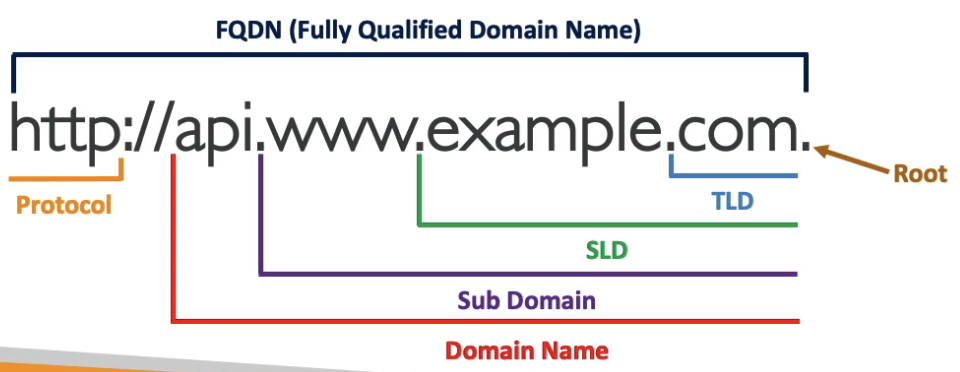
- Domain Register: Amazon Route 53, GoDaddy, …
- DNS Records: A, AAAA, CNAME, NS, …
- Zone File: DNS 레코드를 포함
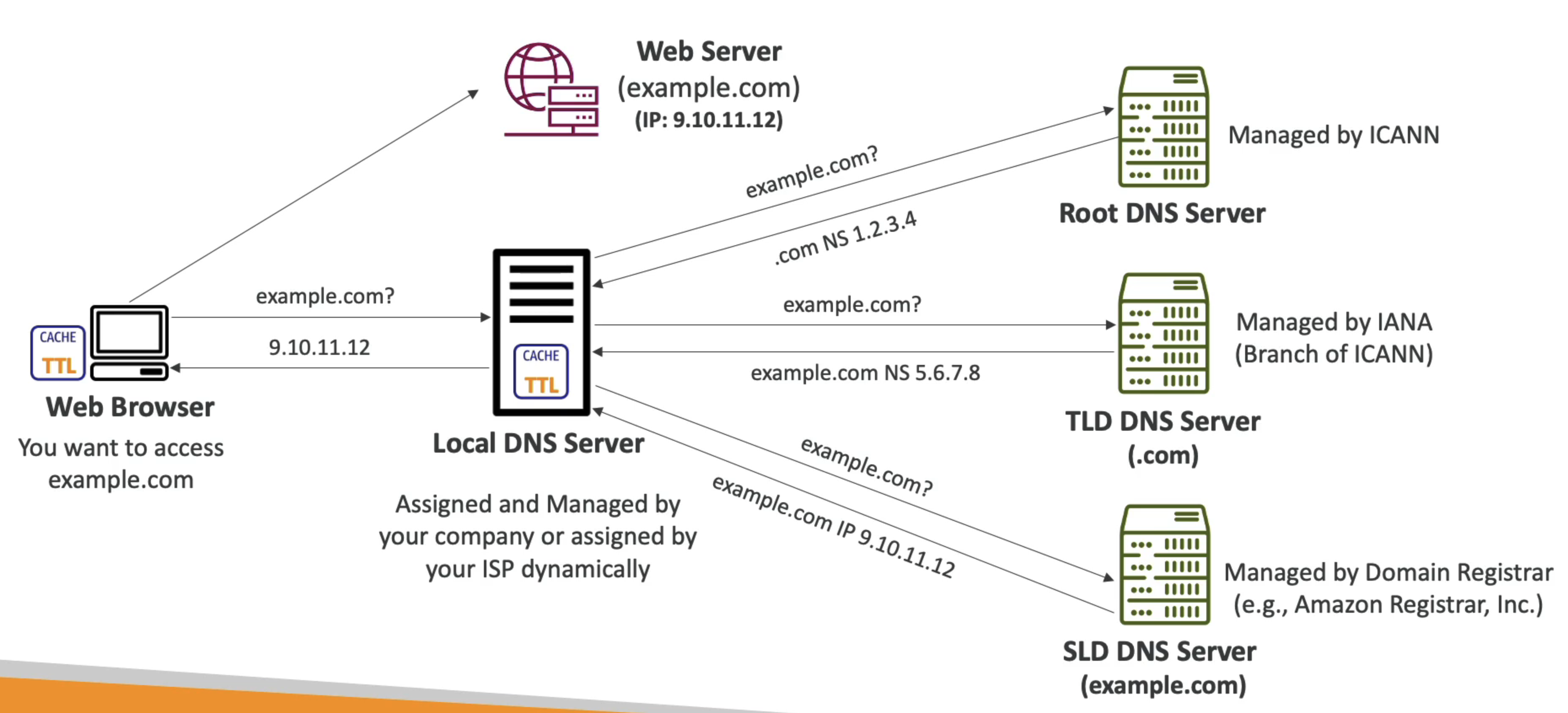
- Name Server: DNS 쿼리를 해석 (Authoritative 또는 Non-Authoritative)
- Top Level Domain (TLD):
.com,.gov,.org, … - Second Level Domain (SLD):
amazon.com,google.com, …
How DNS works
Amazon Route 53
- 고가용성, 확장 가능한, 완전 관리형 Authoritative DNS
- Authoritative: 고객이 DNS 레코드를 업데이트할 수 있음
- R53은 도메인 등록 기관이기도 함
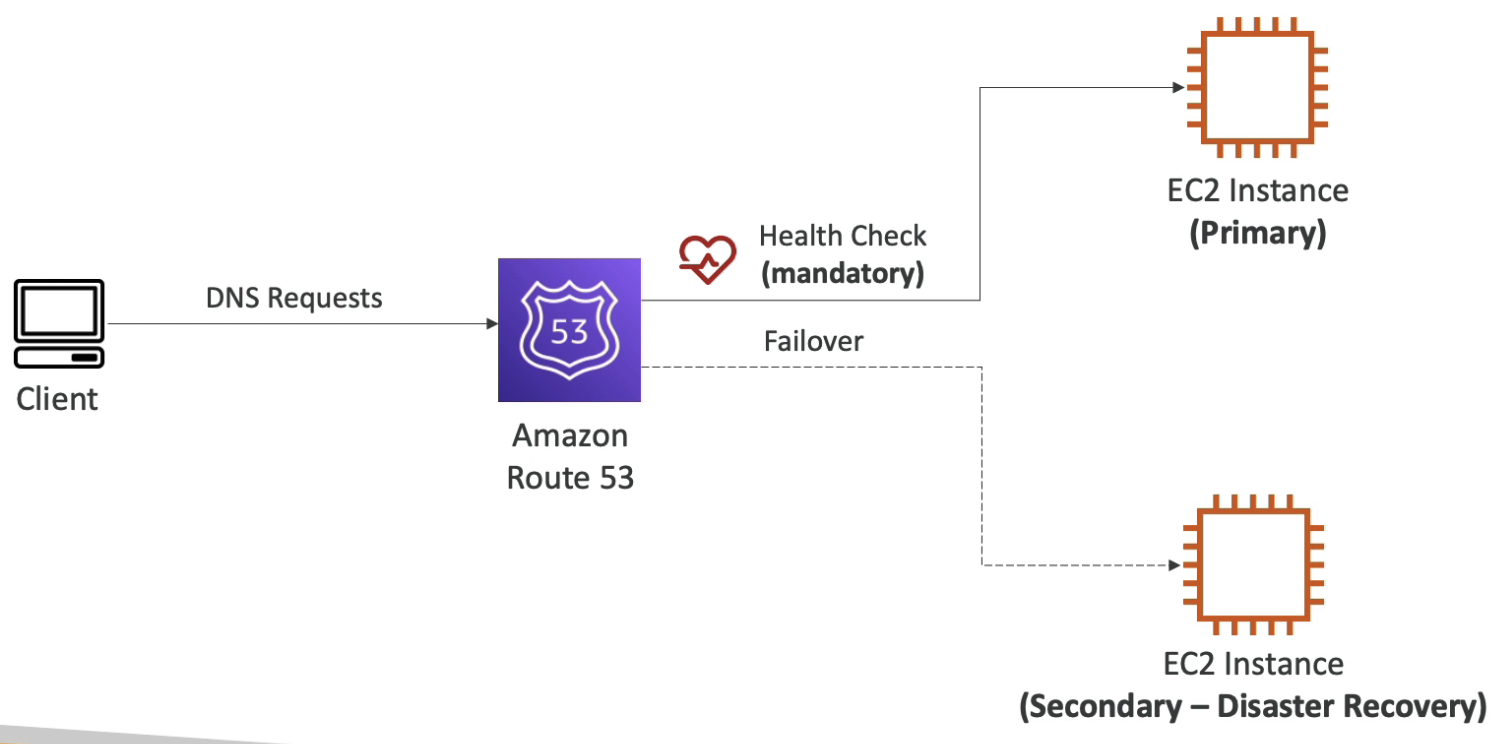
- 상태 확인 기능 제공
- 100% 가용성 SLA를 제공하는 유일한 AWS 서비스
Records
- 도메인에 대한 트래픽을 라우팅하는 방법
- 각 레코드는 다음을 포함:
- Domain/Subdomain Name: e.g. example.com
- Record Type: e.g. A or AAAA
- Value: e.g. 123.456.789.123
- Routing Policy: R53이 쿼리에 응답하는 방법
- TTL: DNS Resolver에 레코드가 캐시되는 시간
- R53이 지원하는 DNS 레코드 타입:
- A / AAAA / CNAME / NS
- (Advanced) CAA / DS / MX / NAPTR / PTR / SOA / TXT / SPF / SRV
Record Types
- A: 호스트명을 IPv4로 매핑
- AAAA: 호스트명을 IPv6로 매핑
- CNAME: 호스트명을 다른 호스트명으로 매핑
- 대상은 A 또는 AAAA 레코드가 있어야 하는 도메인 이름
- DNS 네임스페이스의 최상위 노드(Zone Apex)에는 CNAME 레코드를 생성할 수 없음
- NS: Hosted Zone의 Name Server
- 도메인의 트래픽 라우팅 방법을 제어
CNAME vs Alias
- AWS 리소스(LB, CloudFront, …)는 AWS 호스트명을 노출
- CNAME
- 호스트명을 다른 호스트명으로 지정 (app.domain.com ⇒ any.thing.com)
- 루트 도메인이 아닌 경우에만 사용 가능 (sub.domain.com)
- Alias
- 호스트명을 AWS 리소스로 지정 (app.domain.com ⇒ any.amazonaws.com)
- 루트 도메인 및 비루트 도메인 모두 작동 (domain.com)
- 무료
- 기본 상태 확인 지원
Alias Records
- 호스트명을 AWS 리소스로 매핑
- DNS 기능의 확장
- 리소스의 IP 주소 변경을 자동으로 인식
- CNAME과 달리 DNS 네임스페이스의 최상위 노드(Zone Apex)에 사용 가능
- e.g. example.com
- Alias Record는 항상 AWS 리소스에 대한 A/AAAA 타입 (IPv4/IPv6)
- TTL 설정 불가
- Alias Records 대상
- ELB
- CloudFront Distributions
- API Gateway
- EB Environments
- S3 Websites
- VPC Interface Endpoints
- Global Accelerator’s Accelerator
- 동일한 hosted zone의 R53 Record
- 단, EC2 DNS name은 설정 불가
Hosted Zones
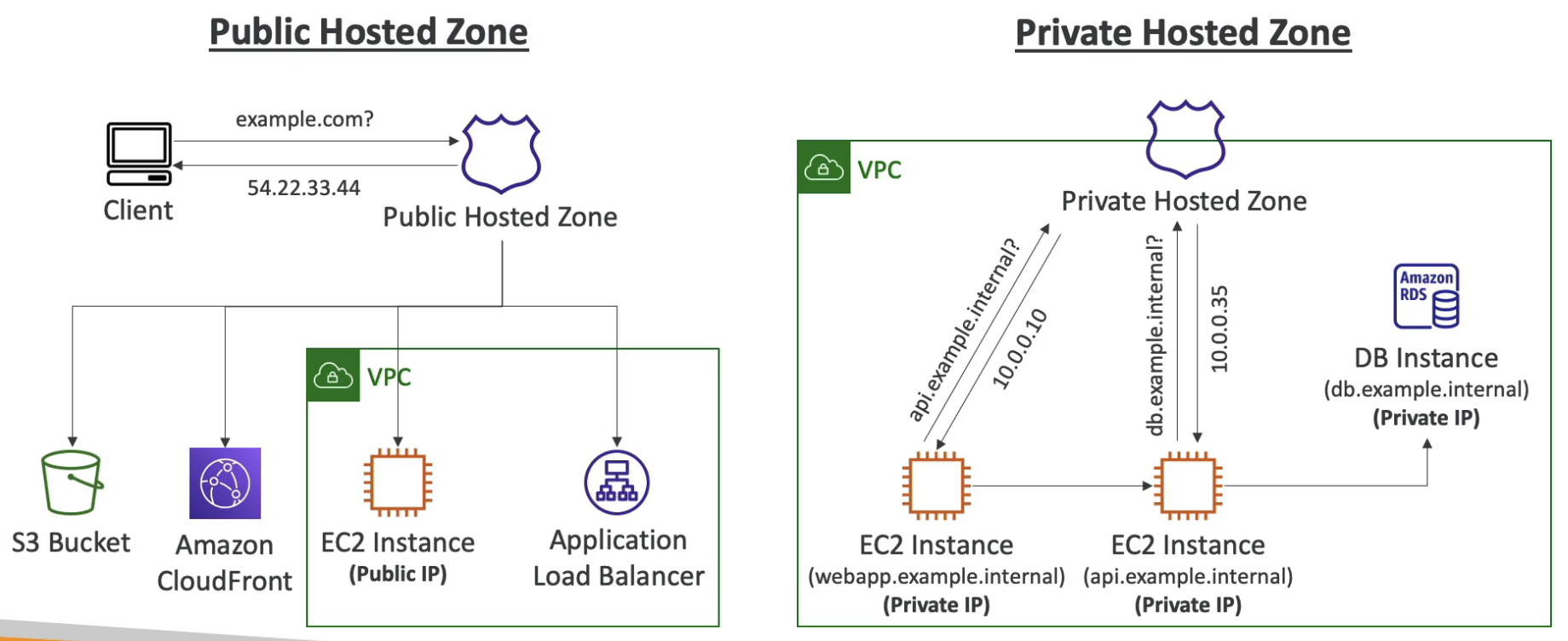 Route 53 에서 Host Zone 은 도메인(예:
 example.com)과 그 하위 도메인(예: sub1.example.com, sub2.example.com)에 대한 DNS 레코드를 관리하는 단위이다. 즉, Zone 이란 DNS 서버가 관리하는 특정 도메인의 범위를 뜻하고 관리하는 도메인 이름(예: example.com)은 곧 호스트 존의 이름(예: example.com)이 된다. Hosted Zone 은 관리하는 도메인의 범위에 따라 Public Hosted Zones, Private Hosted Zones 두 가지로 구분되며 Hosted Zone 당 월 $0.5 가 청구된다.
Public Hosted Zones
- 인터넷에서 접근 가능한 공개된 도메인의 DNS 레코드를 관리한다.
- 예를 들어,
example.com이라는 도메인을 인터넷을 통해 사용자들이 접근할 수 있도록 설정할 수 있다.
Private Hosted Zones
- VPC 내부에서만 접근 가능한 도메인의 DNS 레코드를 관리한다.
- 내부 시스템 간의 DNS 이름 해석을 위해 사용된다.
Resolver Endpoints
- Inbound Endpoint
- On-premises 네트워크에서 들어오는 DNS 쿼리를 처리하는 VPC의 엔드포인트
- VPC 내의 도메인 이름에 대한 DNS 쿼리를 처리하는 데 사용
- On-premises DNS Resolver가 DNS 쿼리를 R53 Resolver로 전달 가능
- On-premises DNS Resolver가 R53 Private Hosted Zone에서 AWS 리소스 및 레코드에 대한 도메인 이름 확인 가능
- Outbound Endpoint
- VPC에서 On-premises 네트워크로 DNS 쿼리를 전달하는 VPC의 엔드포인트
Health Checks
- HTTP Health Check는 Public 리소스에만 사용 가능
- Health Check → 자동 DNS Failover:
- 엔드포인트를 모니터링하는 Health Check (애플리케이션, 서버, 기타 AWS 리소스)
- 약 15개의 글로벌 Health Checker가 엔드포인트 상태를 확인
- 엔드포인트가 2xx 또는 3xx로 응답할 때만 Health Check 통과
- 응답의 첫 5120바이트의 텍스트를 기반으로 통과/실패를 설정할 수 있음
- 다른 Health Check를 모니터링하는 Health Check (Calculated Health Checks)
- 여러 Health Checker의 결과를 단일 Health Check로 결합
- 모든 Health Check가 실패하지 않고 웹사이트 유지보수를 수행하는 데 사용
- CloudWatch Alarm을 모니터링하는 Health Check
- R53 Health Checker는 VPC 외부에 있음
- CW 메트릭과 CW 알람을 Health Check 알람에 연결
- 엔드포인트를 모니터링하는 Health Check (애플리케이션, 서버, 기타 AWS 리소스)
- Health Check는 CloudWatch 메트릭과 통합됨
Routing Policies
- R53이 DNS 쿼리에 응답하는 방법 정의
- R53이 지원하는 Routing Policy
- Simple
- Weighted
- Failover
- Latency-based
- Geolocation
- Multi-Value Answer
- Geoproximity (R53 Traffic Flow 기능 사용)
Simple
- 일반적으로 단일 리소스로 트래픽 라우팅
- 동일한 레코드에 여러 값을 지정할 수 있음
- 클라이언트가 임의로 하나를 선택
- Alias가 활성화된 경우 하나의 AWS 리소스만 지정
- Health Check와 연결 불가
Weighted
- 각 특정 리소스로 가는 요청의 %를 제어
- 각 레코드에 상대적 가중치 할당
- DNS 레코드는 동일한 이름과 타입을 가져야 함
- Health Check와 연결 가능
- 트래픽 전송을 중지하려면 레코드에 가중치 0을 할당
- 모든 레코드의 가중치가 0이면 모든 레코드가 동등하게 반환됨
Failover
Latency-based
- 사용자에게 가장 낮은 지연 시간을 가진 리소스로 리디렉션
- 지연 시간은 사용자와 AWS 리전 간의 트래픽을 기반으로 함
- Health Check와 연결 가능
Geolocation
- Latency-based와 다름
- 이 라우팅은 사용자 위치를 기반으로 함
- 대륙, 국가 또는 미국 주별로 위치 지정
- 위치 일치가 없는 경우를 대비해 “Default” 레코드를 생성해야 함
- 사용 사례: 웹사이트 현지화, 콘텐츠 배포 제한, …
- Health Check와 연결 가능
Geoproximity
- 사용자 및 리소스의 지리적 위치를 기반으로 리소스로 트래픽 라우팅
- 정의된 바이어스를 기반으로 리소스로 더 많은 트래픽을 이동시킬 수 있음
- 지리적 영역의 크기를 변경하려면 바이어스 값을 지정:
- 확장 (1 to 99) - 리소스로 더 많은 트래픽
- 축소 (-1 to -99) - 리소스로 더 적은 트래픽
- 이 기능을 사용하려면 R53 Traffic Flow(고급)를 사용해야 함
IP-based Routing
- 클라이언트의 IP 주소를 기반으로 라우팅
- 클라이언트를 위한 CIDR 목록과 해당 엔드포인트/위치 제공
- 사용 사례: 성능 최적화, 네트워크 비용 절감, …
- e.g. 특정 ISP의 최종 사용자를 특정 엔드포인트로 라우팅
Multi-Value
- 여러 리소스로 트래픽을 라우팅할 때 사용
- R53은 여러 리소스를 반환
- Health Check와 연결 가능
- 각 Multi-Value 쿼리에 대해 최대 8개의 정상 레코드가 반환됨
- Multi-Value는 ELB를 대체하는 것이 아님